计算机
c base
c++ 基础 作用域及生命周期
c++ template
c++ 内存视角
c++ 函数
c++ 基础 基础语法
c++ 性能
c++ 类 基础
c++ 类 对象模型 类析构
c++ 类 设计模式
C++ STL
cmake
CMAKE环境搭建 windows
创建第一个cmakelists.txt
构建稍复杂的项目
动态链接库
EX1
EX1 START
EX1 ANSWER
EX2
EX2 START
EX2 ANSWER
EX3
EX3 START
EX3 ANSWER
变量
控制流程
函数和宏
查找和使用外部库
生成器表达式
qt
qt c++
qt index
qt qml quick
qt ui
qt 多线程
理解QObject 1
理解QObject 4
C++ 技巧 反射
理解QObject 2
理解QObject 3
理解QObject 6
理解 QObject 5
QCoreApplication
QApplication
Q_OBJECT
数据结构
PC问题监控及排查
PC程序性能优化
OS
TOOL
编程漫谈
sealos+frp,搭建内网穿透
host主机配置
C++实战 主题
多线程
生产者-消费者流水线
IO
网络
Bilinotes搭建
编译原理
WEB开发
TS
HTML CSS JAVASCRIPT
OPENGL绘图
设计模式
计算机基础
CPU
微机原理
本站点使用 MrDoc 构建
-
+
qt index
# QT search in doc pool: Qt Designer: GUI设计工具 QT Creator: IDE,提供代码编辑、编译、调试和项目管理功能 qml/qt quick (qt design studio) qt widget (qt creator) # QT - qt version history \<trace\> \ [qt history](https://wiki.qt.io/Qt_History)\ [qt version history](https://wiki.qt.io/Qt_version_history)\ [release information](https://wiki.qt.io/Template:Release_Information)\ [qt4 version](https://wiki.qt.io/Qt_4_versions)\ [ABI symbols qt](https://abi-laboratory.pro/index.php?view=timeline&l=qt) [qt offline download](https://www.qt.io/offline-installers) [qt style sheet](https://doc.qt.io/qt-6/stylesheet-syntax.html#conflict-resolution) [ref qss](https://www.cnblogs.com/linuxAndMcu/p/11039769.html#_label0) · # QT 开发环境 ## qt包安装 ```c aqt install-qt windows desktop 6.8.3 win64_msvc2022_64 --outputdir "D:\qt6.8.3" ququick、qtcurrent已安装 ``` ## qml引入 ```c qt_add_executable( qml.qrc ) ``` ## 生成可执行文件 ```c windeployqt6.exe xx.exe windeployqt6.exe --qmldir .. xx.exe //xx.exe in folder build ``` # QML  [qt QML QUICK](https://www.cnblogs.com/apeishuai/articles/18737433 "发布于 2025-02-25 22:23") https://qthub.com/doc/QmlBook/cn/ ## qt quick ECMAScript //语法符合此规定 import QtQuick (import用来导入一个模块) QML对象树 Item是根对象、可以辅助分组 子元素从父元素上继承了坐标系统,它的x,y坐标总是相对应于它的父元素坐标系统。 2.x版本中能否混用1.x版本的控件? 答案是可以。只需要使用别名机制即可。 启动qt quick方式: QQmlApplicationEngine搭配Window QQuickView搭配Item ## qml逻辑 动态特性 动态属性、信号动态连接 运行时灵活修改 组件复用 Loader、内联组件、代理属性 UI模块化 状态管理 State、Transition、绑定控制 交互式界面 性能优化 延迟加载、图层渲染、绑定控制 复杂界面流畅性 数据展示 动态模型、委托选择器 列表/表格数据 跨组件通信 单例、事件总线、信号转发 组件解耦 基本要素: Item{ } 布局: flow // 非预期行为 外界因素导致的 静态布局:xxx 按钮:抽象 normalUrl hoveredUrl pressedUrl disabledUrl imageWidth: imageHeight: Repeater、positioner qt mousearea key ## qt quick 组件 Window //window创建一个顶层窗口 Item //布局型 Rectangle Button: onclicked Text Image 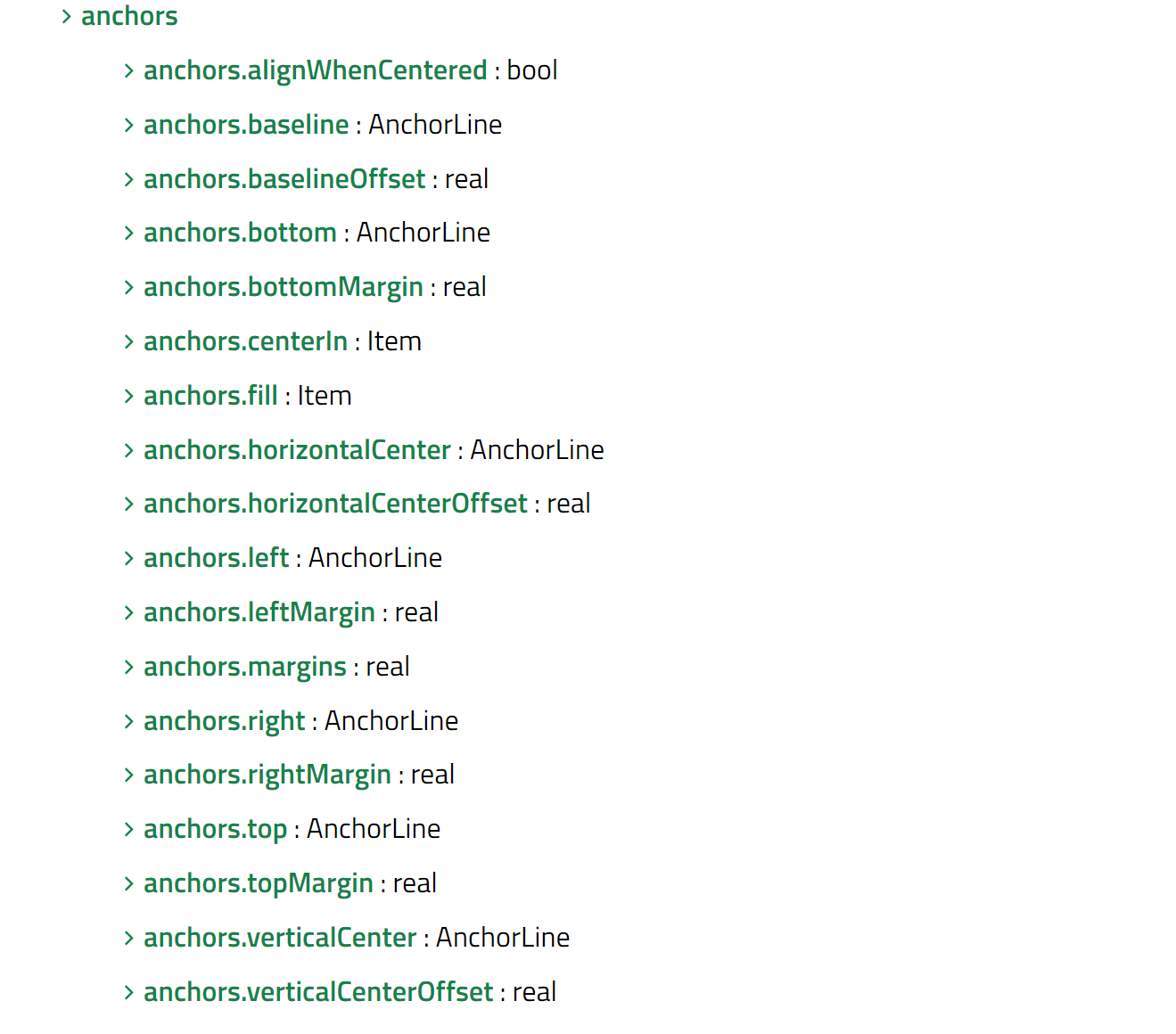 Property: id Key //行为型 signal properties have a KeyEvent parameter, named event which contains details of the event. If a key is handled event.accepted should be set to true to prevent the event from propagating up the item hierarchy. See Qt.Key for the list of keyboard codes. 每个元素都能提供信号操作 属性和作用域: 一个元素id应该只在当前文档中被引用。QML提供了动态作用域的机制,后加载的文档会覆盖之前加载文档的元素id号;所以采用属性转发的方式xxx alias属性转发: 属性绑定: 当一个新的绑定生效或者使用JavaScript赋值给属性时,绑定的生命周期就会结束 在 QML 中,任何属性变化都可以直接通过 onChanged 信号处理器捕获 QML组件,其名称第一个字母为大写 properties var 可以定义任何类型, 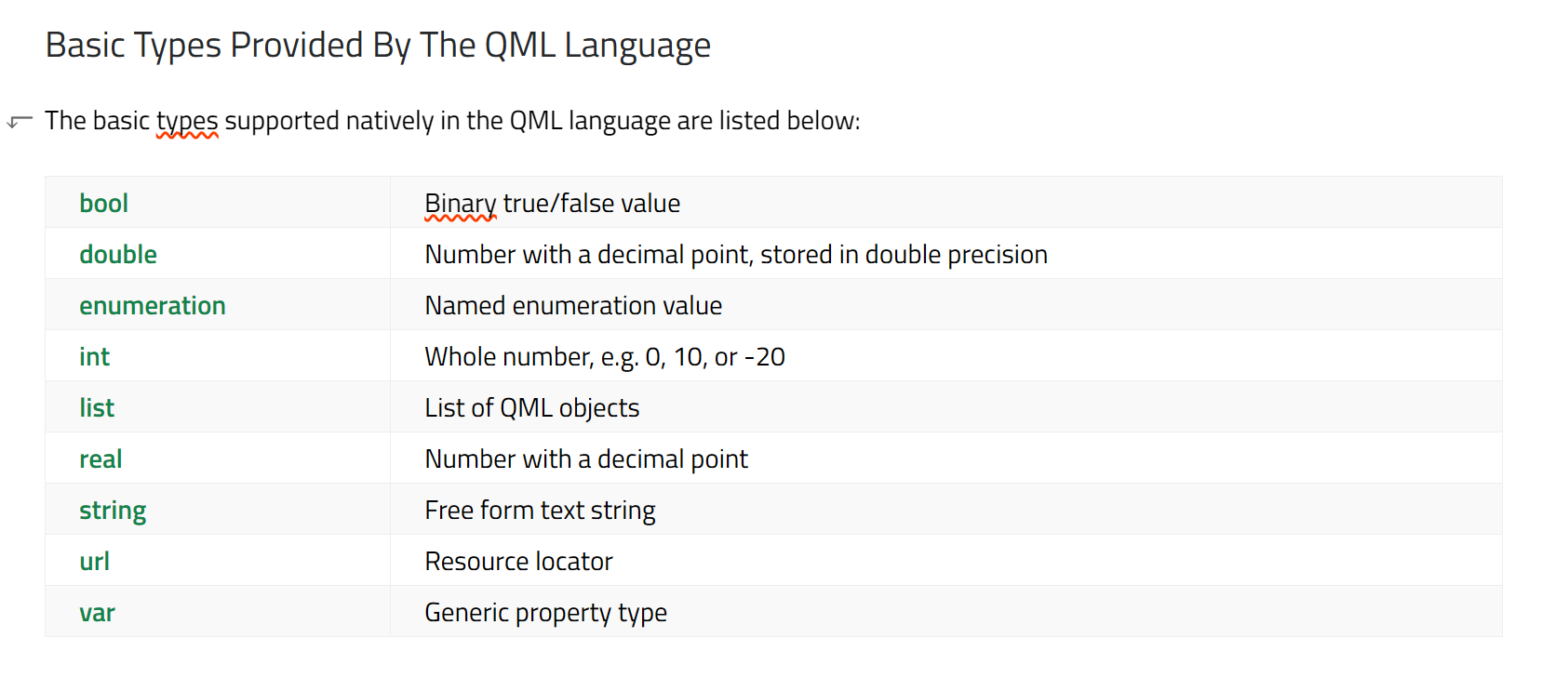 ### QQuickFramebufferObject To render into the FBO, the user should subclass the Renderer class and reimplement its Renderer::render() function. The Renderer subclass is returned from createRenderer(). Both Renderer and the FBO are memory managed internally render-->Rendef::render()-->FBO(the size of the FBO will by default adapt to the size of the item) QQuickFramebufferObject::Renderer::synchronize(): called render thread render occur on a dedicated thread item implementation V.S. FBO rendering usage: QOpenglfunctions(QOpenGLExtraFunctions) + QQuickFramebufferObject handle/body idiom QOpenGLContext:Represents a native OpenGL context, enabling OpenGL rendering on a QSurface QOpenGLContextGroup:Represents a group of contexts sharing OpenGL resources QOpenGLExtraFunctions:Cross-platform access to the OpenGL ES 3.0, 3.1 and 3.2 API QOpenGLFunctions:Cross-platform access to the OpenGL ES 2.0 API QOpenGLTexture ## 定位方法 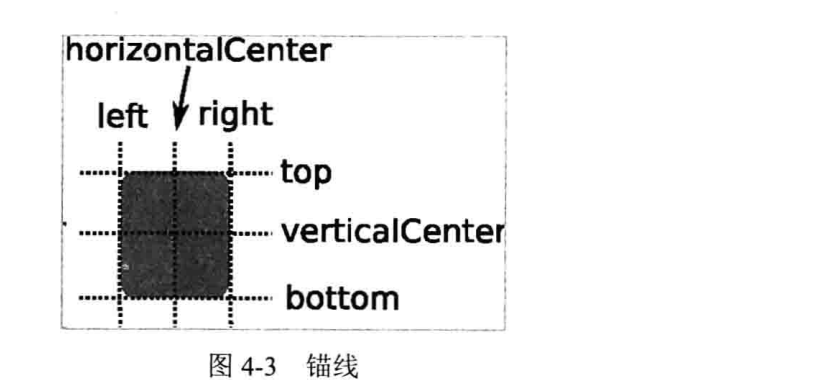 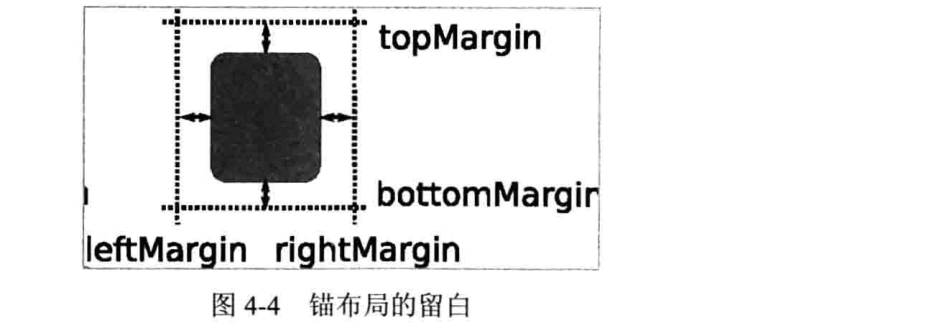 ## Layout Gridlayout Rowlayout Columnlayout stacklayout layout layoutitemproxy splitview component(同文件内,组件) ## other QML API: For the most basic of visuals, Qt Quick provides a Rectangle type to draw rectangles Qt Quick provides an Image type which may be used to display images. <Image ```less // This element displays an image. Because the source is online, it may take some time to fetch Image { x: 40 y: 20 width: 61 height: 73 source: "http://codereview.qt-project.org/static/logo_qt.png" } // This element show Rectangle xxx Item { width: 320 height: 480 Rectangle { color: "#272822" width: 320 height: 480 } ``` All visual **items** provided by Qt Quick are based on the Item type, which provides a common set of attributes for visual items, including opacity(不透明性) and transform(变化) attributes. ### positing with anchors ```delphi anchors.left: undefined //remove the left anchor anchors.fill provides a convenient way for one item to have the same geometry as another item, and is equivalent to connecting all four directional anchors. ```
peipeo
2026年5月16日 16:33
转发文档
收藏文档
上一篇
下一篇
手机扫码
复制链接
手机扫一扫转发分享
复制链接
Markdown文件
PDF文档(打印)
分享
链接
类型
密码
更新密码