剪藏
Rethinking your position
Learn how to learn
3R编码 | nestjs最佳实践 - 课程概览
3R编码 | Node.js开发环境搭建
3R编码 | Nestjs+Eslint+SWC应用初始化及断点调试
3R编码 | 装饰器与反射
3R编码 | Nestjs核心概念
3R编码 | 无懈可击的Linux服务器构建
3R编码 | 使用Turborepo+pnpm workspaces构建monorepo应用
3R编码 | 使用Gitea+Drone自建CICD平台
3R编码 | 整合Typeorm实现CRUD
3R编码 | 请求数据的验证和响应数据的序列化
3R编码 | 数据关联与树形嵌套结构的分类和评论的实现
3R编码 | 自定义全局的验证管道,拦截器和过滤器
3R编码 | 自定义数据验证约束及约束中的依赖注入
3R编码 | 批量操作及软删除(回收站)功能使用
3R编码 | 数据库与MeiliSearch的全文搜索
3R编码 | 数据操作代码的抽象化
3R编码 | 整合bun与pm2实现开发环境与生产环境免编译和自启
3R编码 | 自建配置系统实现
3R编码 | 嵌套路由与Swagger文档实现
3R编码 | 使用Yargs构建命令行工具
3R编码 | 生产环境下静默启动以及PM2 API的使用
3R编码 | 数据迁移功能的实现
3R编码 | 数据填充命令实现
3R编码 | 用户模块开发以及使用Passport实现JWT认证和无痛刷新
3R编码 | 基于CASL的RBAC动态角色及权限系统实现
3R编码 | 模型动态关联与基于CASL的动态权限的实现
3R编码 | 使用BullMQ实现异步验证短信与邮件发送
3R编码 | WebSocket实现消息广播功能
3R编码 | chapter27
3R编码 | chapter28
3R编码 | TS全栈+AI开发实战 - 课程概览
3R编码 | Node.js环境搭建及应用初始化
3R编码 | Next.js应用初始化
3R编码 | React内置Hooks的使用与自定义详解
3R编码 | Next.js中使用Zustand进行状态管理详解
3R编码 | Next.js核心概念及应用构建
微电子学第1话 MOS Differential Pair (I)
微电子学第1话 MOS Differential Pair (I)
微电子学第3话 CMRR
微电子学第2话 MOS Differential Pair (II)
终于有人讲了,凭什么三极管能放大?
降低人类负担:类型系统即边界
固态变压器SST是什么
本站点使用 MrDoc 构建
-
+
3R编码 | 数据迁移功能的实现
前面我的应用是使用数据库同步的方式来更改数据库表结构,也就是每次更改模型后一启动应用就会自动同步最新的模型生成的表结构到数据库。这种做法其实是非常不安全的,尤其在生产环境下,很容易导致我们的数据丢失。所以我们需要使用一种较为安全的方式来修改表结构-即数据结构迁移! 默认的Typeorm虽然支持迁移,但是没有同Nestjs进行整合的,包括动态配置,命令整合等都无。不过有了我们前面章节的基础之后,现在我们就可以直接通过修改Typeorm的默认迁移命令来深度整合我们的课程框架里的Nestjs应用啦,接下来我们学习一下如何实现! ### 学习目标[](#学习目标 "学习目标的直接链接") - 实现数据库的迁移功能,包含创建迁移、生成迁移、运行迁移、回滚迁移 - 实现应用启动及重载后自动运行迁移 ### 依赖解析[](#依赖解析 "依赖解析的直接链接") - 不需要关注`@sqltools/formatter`这个库的作用,因为在复制修改typeorm的迁移命令源码时遇到,所以要安装一下 - [ora](https://github.com/sindresorhus/ora)用于生成命令行的雪碧图。这个库只支持esm,所以前面我们已经放入`ignoreDependencies`这个版本锁定的键中 ``` pnpm add @sqltools/formatter ora@5 ``` ### 应用改造[](#应用改造 "应用改造的直接链接") #### 类型[](#类型 "类型的直接链接") 在实现迁移之前我们先为TypeORM的数据库配置添加上一个`paths`类型的属性,用于设置`migrations`以及其它文件的路径。然后把这个`paths`放在一个新的类型`DbAdditionalOption`里面,再为`TypeormOption`,`DbConfig`的`common`属性添加上该类型 ``` // src/modules/database/types.ts/** * 额外数据库选项,用于CLI工具 */type DbAdditionalOption = { paths?: { /** * 迁移文件路径 */ migration?: string; };};/** * 自定义数据库配置 */export type DbConfig = { common: Record<string, any> & DbAdditionalOption; connections: Array<TypeOrmModuleOptions & { name?: string } & DbAdditionalOption>;};/** * Typeorm连接配置 */export type TypeormOption = Omit<TypeOrmModuleOptions, 'name' | 'migrations'> & { name: string;} & DbAdditionalOption; ``` #### 默认配置[](#默认配置 "默认配置的直接链接") 修改默认配置做一下调整 1. 添加一个公共的默认配置`paths`,用于设置迁移文件的路径 2. 把每个数据库连接的`synchronize`强制关闭(防止自定义开启),这样就能避免自动通过`entity`去同步表结构以防止生产环境下破坏数据.代之以迁移的方式去安全地更新我们的表结构 ``` // src/modules/database/config.tsexport const createDbOptions = (options: DbConfig) => { const newOptions: DbOptions = { common: deepMerge( { charset: 'utf8mb4', logging: ['error'], paths: { migration: resolve(__dirname, '../../database/migrations'), }, }, options.common ?? {}, 'replace', ), connections: createConnectionOptions(options.connections ?? []), }; newOptions.connections = newOptions.connections.map((connection) => { const entities = connection.entities ?? []; const newOption = { ...connection, entities }; return deepMerge( newOptions.common, { ...newOption, autoLoadEntities: true, synchronize: false, } as any, 'replace', ) as TypeormOption; }); return newOptions;}; ``` #### 模型与订阅者[](#模型与订阅者 "模型与订阅者的直接链接") 一、编写添加函数 由于 - 迁移用到的数据库配置中无法自动加载模型和订阅者等 - 后续我们需要对模型可以进行更多的定制,比如添加动态关联等 所以在编写迁移之前,我们先来编写添加模型和订阅者的函数 - `addEntities`函数会根据传入的`dataSource`来判断把模型追加到哪个连接池,并使用`TypeOrmModule.forFeature`为Nestjs中的TypeormModule自动注册这些模型 - `addSubscribers`函数会根据传入的`dataSource`来判断把订阅者追加到哪个连接池 ``` // src/modules/database/helpers.ts/** * 在模块上注册entity * @param configure 配置类实例 * @param entities entity类列表 * @param dataSource 数据连接名称,默认为default */export const addEntities = async ( configure: Configure, entities: EntityClassOrSchema[] = [], dataSource = 'default',) => { const database = await configure.get<DbOptions>('database'); if (isNil(database)) throw new Error(`Typeorm have not any config!`); const dbConfig = database.connections.find(({ name }) => name === dataSource); // eslint-disable-next-line prettier/prettier, prefer-template if (isNil(dbConfig)) throw new Error('Database connection named' + dataSource + 'not exists!'); const oldEntities = (dbConfig.entities ?? []) as ObjectLiteral[]; /** * 更新数据库配置,添加上新的模型 */ configure.set( 'database.connections', database.connections.map((connection) => connection.name === dataSource ? { ...connection, entities: [...entities, ...oldEntities], } : connection, ), ); return TypeOrmModule.forFeature(entities, dataSource);};/** * 在模块上注册订阅者 * @param configure 配置类实例 * @param subscribers 订阅者列表 * @param dataSource 数据库连接名称 */export const addSubscribers = async ( configure: Configure, subscribers: Type<any>[] = [], dataSource = 'default',) => { const database = await configure.get<DbConfig>('database'); if (isNil(database)) throw new Error(`Typeorm have not any config!`); const dbConfig = database.connections.find(({ name }) => name === dataSource); // eslint-disable-next-line prettier/prettier, prefer-template if (isNil(dbConfig)) throw new Error('Database connection named' + dataSource + 'not exists!'); const oldSubscribers = (dbConfig.subscribers ?? []) as any[]; /** * 更新数据库配置,添加上新的订阅者 */ configure.set( 'database.connections', database.connections.map((connection) => connection.name === dataSource ? { ...connection, subscribers: [...oldSubscribers, ...subscribers], } : connection, ), ); return subscribers;}; ``` 二、修改订阅者 因为在迁移时,数据库配置中无法直接使用依赖注入,比如订阅者中注入数据连接池或者其它服务等,所以 1. 需要修改一下订阅者 首先我们修改一下订阅者基类,使得`dataSource`变成可选依赖,这样在CLI加载这个订阅者(Subscriber会被自动实例化)的时候就不会出现因为丢失`dataSource`依赖了 2. 同样的添加`configure`依赖注入,如果没有,则从`app`中获取,并添加一个`container`容器获取方法 ``` // src/modules/database/base/subcriber.ts@EventSubscriber()export abstract class BaseSubscriber<E extends ObjectLiteral> implements EntitySubscriberInterface<E>{ // ... constructor( @Optional() protected dataSource?: DataSource, @Optional() protected _configure?: Configure, ) { if (!isNil(this.dataSource)) this.dataSource.subscribers.push(this); } get configure(): Configure { return !isNil(this._configure) ? this._configure : app.container.get(Configure, { strict: false }); } get container(): NestFastifyApplication { return app.container; }} ``` 接下来修改`PostSubscriber`,使`SanitizeService`通过`container`实例获取,而不是直接注入 ``` // src/modules/content/subscribers/post.subscriber.ts@EventSubscriber()export class PostSubscriber extends BaseSubscriber<PostEntity> { protected entity = PostEntity; /** * 加载文章数据的处理 * @param entity */ async afterLoad(entity: PostEntity) { const sanitizeService = (await this.configure.get('content.htmlEnabled')) ? this.container.get(SanitizeService) : undefined; if (!isNil(sanitizeService) && entity.type === PostBodyType.HTML) { entity.body = sanitizeService.sanitize(entity.body); } }} ``` 三、修改模块 然后修改一下模块的加载方式 ``` // src/modules/content/content.module.tsimport * as subscribers from './subscribers';@Module({})export class ContentModule { static async forRoot(configure: Configure) { const config = await configure.get<ContentConfig>('content', defaultContentConfig); const providers: ModuleMetadata['providers'] = [ ...Object.values(services), ...(await addSubscribers(configure, Object.values(subscribers))), // .. ]; // ... return { module: ContentModule, imports: [ await addEntities(configure, Object.values(entities)), DatabaseModule.forRepository(Object.values(repositories)), ], // controllers: Object.values(controllers), providers, exports, }; }} ``` ### 雪碧图[](#雪碧图 "雪碧图的直接链接") 使用ora为某些延时命令添加正在执行中的命令行雪碧图 修改`PanicOption`类型 ``` // src/modules/core/types.ts/** * 控制台错误函数panic的选项参数 */export interface PanicOption { // /** * ora对象 */ spinner?: Ora;} ``` 修改`panic`函数 ``` // src/modules/core/helpers/command.ts/** * 输出命令行错误消息 * @param option */export async function panic(option: PanicOption | string) { console.log(); if (typeof option === 'string') { console.log(chalk.red(`\n❌ ${option}`)); process.exit(1); } const { error, message, spinner, exit = true } = option; if (!isNil(error)) { !isNil(spinner) ? spinner.fail(chalk.red(error)) : console.log(chalk.red(error)); } else { !isNil(spinner) ? spinner.succeed(chalk.red(`\n❌ ${message}`)) : console.log(chalk.red(`\n❌ ${message}`)); } if (exit) process.exit(1);} ``` 该命令用于创建一个空的迁移文件,我们可以在迁移文件中编写自己的迁移 手动创建迁移命令`dbmc`一般用于对比当前迁移文件得到当前数据库表结构是最新版本时,你又想新增一些表结构修改操作,这时候可以手动创建一个迁移文件再`up`以及`down`方法里做一些调整 ### 类型[](#类型-1 "类型的直接链接") 1. 所有命令的参数选项都继承自`yargs.Arguments`,而数据库命令都是需要设置链接的,所以在此基础上添加上`connection`选项,得到一个公共的数据库命令参数类型`TypeOrmArguments` 2. `MigrationCreateOptions`类型中的`name`即为迁移文件的名称前缀,后面跟一串随机字符 ``` // src/modules/database/commands/types.ts/** * 基础数据库命令参数类型 */export type TypeOrmArguments = Arguments<{ connection?: string;}>;/** * 创建迁移命令参数 */export type MigrationCreateArguments = TypeOrmArguments & MigrationCreateOptions;/** * 创建迁移处理器选项 */export interface MigrationCreateOptions { name: string;} ``` ### 执行逻辑[](#执行逻辑 "执行逻辑的直接链接") 创建迁移的执行逻辑根据typeorm的创建[迁移命令的源码](https://github.com/typeorm/typeorm/blob/master/src/commands/MigrationCreateCommand.ts)修改而来,请自行查看其源码(只需要修改我们需要修改的地方,无需理会`CommandUtils`这种工具的原理) ``` // src/modules/database/commands/typeorm-migration-create.tsconst { CommandUtils } = require('typeorm/commands/CommandUtils');const { PlatformTools } = require('typeorm/platform/PlatformTools');const { camelCase } = require('typeorm/util/StringUtils');type HandlerOptions = MigrationCreateOptions & { dir: string };/** * Creates a new migration file. */export class TypeormMigrationCreate { async handler(args: HandlerOptions) { try { const timestamp = new Date().getTime(); const directory = args.dir.startsWith('/') ? args.dir : resolve(process.cwd(), args.dir); const fileContent = TypeormMigrationCreate.getTemplate(args.name as any, timestamp); const filename = `${timestamp}-${args.name}`; const fullPath = `${directory}/${filename}`; await CommandUtils.createFile(`${fullPath}.ts`, fileContent); console.log( `Migration ${chalk.blue(`${fullPath}.ts`)} has been generated successfully.`, ); } catch (err) { PlatformTools.logCmdErr('Error during migration creation:', err); process.exit(1); } } /** * Gets contents of the migration file. */ protected static getTemplate(name: string, timestamp: number): string { return `import typeorm = require('typeorm');class ${camelCase(name, true)}${timestamp} implements typeorm.MigrationInterface { public async up(queryRunner: typeorm.QueryRunner): Promise<void> { } public async down(queryRunner: typeorm.QueryRunner): Promise<void> { }}`; }} ``` ### 处理器[](#处理器 "处理器的直接链接") ``` // src/modules/database/commands/migration-create.handler.ts/** * 创建迁移处理器 * @param configure * @param args */export const MigrationCreateHandler = async ( configure: Configure, args: Arguments<MigrationCreateArguments>,) => { const spinner = ora('Start to create migration').start(); const cname = args.connection ?? 'default'; try { const { connections = [] } = await configure.get<DbOptions>('database'); const dbConfig: TypeormOption = connections.find(({ name }) => name === cname); if (isNil(dbConfig)) panic(`Database connection named ${cname} not exists!`); const runner = new TypeormMigrationCreate(); console.log(); runner.handler({ name: cname, dir: dbConfig.paths.migration, }); spinner.succeed(chalk.greenBright.underline('\n 👍 Finished create migration')); } catch (error) { panic({ spinner, message: 'Create migration failed!', error }); }}; ``` ### 命令[](#命令 "命令的直接链接") ``` // src/modules/database/commands/migration-create.command.ts/** * 创建迁移 * @param param0 */export const CreateMigrationCommand: CommandItem<any, MigrationCreateArguments> = async ({ configure,}) => ({ source: true, command: ['db:migration:create', 'dbmc'], describe: 'Creates a new migration file', builder: { connection: { type: 'string', alias: 'c', describe: 'Connection name of typeorm to connect database.', }, name: { type: 'string', alias: 'n', describe: 'Name of the migration class.', demandOption: true, }, } as const, handler: async (args: Arguments<MigrationCreateArguments>) => MigrationCreateHandler(configure, args),}); ``` 注意 在第一次上线后就不是特别建议再使用自动生成迁移命令来迭代数据库了。因为自动生成迁移只是会对比当前连接的数据库和entity来生成,而线上的数据库结构如果和本地不一样就容易出问题 ### 类型[](#类型-2 "类型的直接链接") 命令的参数类型 `MigrationGenerateOptions`为`TypeOrmArguments`这个数据库命令的公共参数类型结合该命令特有的`MigrationGenerateOptions`类型的联合类型,其参数选项如下 - `connection`: 数据库连接名称,默认为`default` ,默认: `default` - `name`: 手动指定迁移文件的类名(即文件名), 默认: 自动生成 - `pretty`: 是否打印生成的迁移文件所要执行的SQL,默认:`false` - `dryrun`: 是否只打印生成的迁移文件的内容而不是直接生成迁移文件,默认: `false` - `check`: 是否只验证数据库是最新的而不是直接生成迁移,默认: `false` - `run`: 这与下面的运行迁移结合起来使用,请看下一部分 ``` // src/modules/database/commands/types.ts/** * 生成迁移命令参数 */export type MigrationGenerateArguments = TypeOrmArguments & MigrationGenerateOptions;/** * 生成迁移处理器选项 */export interface MigrationGenerateOptions { name?: string; run?: boolean; pretty?: boolean; dryrun?: boolean; check?: boolean;} ``` ### 执行逻辑[](#执行逻辑-1 "执行逻辑的直接链接") 所有执行逻辑参考TypeOrm的生成迁移的源码修改,请参考[typeorm的命令源码](https://github.com/typeorm/typeorm/blob/master/src/commands/MigrationGenerateCommand.ts).该类在此基础上修改而来,这里不再赘述 ``` // src/modules/database/commands/typeorm-migration-generate.tstype HandlerOptions = MigrationGenerateOptions & { dataSource: DataSource;} & { dir: string };export class TypeormMigrationGenerate { async handler(args: HandlerOptions) { const timestamp = new Date().getTime(); const extension = '.ts'; // const extension = args.outputJs ? '.js' : '.ts'; const directory = args.dir.startsWith('/') ? args.dir : path.resolve(process.cwd(), args.dir); const filename = `${timestamp}-${args.name}`; const fullPath = `${directory}/${filename}${extension}`; const { dataSource } = args; try { dataSource.setOptions({ synchronize: false, migrationsRun: false, dropSchema: false, logging: false, }); await dataSource.initialize(); const upSqls: string[] = []; const downSqls: string[] = []; try { const sqlInMemory = await dataSource.driver.createSchemaBuilder().log(); if (args.pretty) { sqlInMemory.upQueries.forEach((upQuery) => { upQuery.query = TypeormMigrationGenerate.prettifyQuery(upQuery.query); }); sqlInMemory.downQueries.forEach((downQuery) => { downQuery.query = TypeormMigrationGenerate.prettifyQuery(downQuery.query); }); } sqlInMemory.upQueries.forEach((upQuery) => { upSqls.push( ` await queryRunner.query(\`${upQuery.query.replace( /`/g, '\\`', )}\`${TypeormMigrationGenerate.queryParams(upQuery.parameters)});`, ); }); sqlInMemory.downQueries.forEach((downQuery) => { downSqls.push( ` await queryRunner.query(\`${downQuery.query.replace( /`/g, '\\`', )}\`${TypeormMigrationGenerate.queryParams(downQuery.parameters)});`, ); }); } finally { await dataSource.destroy(); } if (!upSqls.length) { console.log(chalk.green(`No changes in database schema were found`)); process.exit(0); } const fileContent = TypeormMigrationGenerate.getTemplate( args.name, timestamp, upSqls, downSqls.reverse(), ); if (args.check) { console.log( chalk.yellow( `Unexpected changes in database schema were found in check mode:\n\n${chalk.white( fileContent, )}`, ), ); process.exit(1); } if (args.dryrun) { console.log( chalk.green( `Migration ${chalk.blue( fullPath + extension, )} has content:\n\n${chalk.white(fileContent)}`, ), ); } else { await CommandUtils.createFile(fullPath, fileContent); console.log( chalk.green( `Migration ${chalk.blue(fullPath)} has been generated successfully.`, ), ); } } catch (err) { PlatformTools.logCmdErr('Error during migration generation:', err); process.exit(1); } } protected static queryParams(parameters: any[] | undefined): string { if (!parameters || !parameters.length) { return ''; } return `, ${JSON.stringify(parameters)}`; } protected static getTemplate( name: string, timestamp: number, upSqls: string[], downSqls: string[], ): string { const migrationName = `${camelCase(upperFirst(name), true)}${timestamp}`; return `import typeorm = require('typeorm');class ${migrationName} implements typeorm.MigrationInterface { name = '${migrationName}' public async up(queryRunner: typeorm.QueryRunner): Promise<void> {${upSqls.join(``)} } public async down(queryRunner: typeorm.QueryRunner): Promise<void> {${downSqls.join(``)} }}module.exports = ${migrationName}`; } protected static prettifyQuery(query: string) { const formattedQuery = format(query, { indent: ' ' }); return `\n${formattedQuery.replace(/^/gm, ' ')}\n `; }} ``` ### 处理器[](#处理器-1 "处理器的直接链接") 生成迁移需要与运行迁移相结合,所以目前缺少运行迁移的方法导致报错先不用管,具体步骤如下 1. 在生成迁移之前,先运行一次迁移以便把前面没有运行的迁移先同步到数据库,这是为了防止重复生成迁移文件 2. 在指定目录中生成迁移文件 3. 如果是`run`参数为`true`的话,再次运行迁移以便直接把生成的最新迁移同步到数据库 ``` // src/modules/database/commands/migration-generate.handler.ts/** * 生成迁移处理器 * @param configure * @param args */export const MigrationGenerateHandler = async ( configure: Configure, args: Arguments<MigrationGenerateArguments>,) => { await MigrationRunHandler(configure, { connection: args.connection } as any); console.log(); const spinner = ora('Start to generate migration'); const cname = args.connection ?? 'default'; try { spinner.start(); console.log(); const { connections = [] }: DbConfig = await configure.get<DbConfig>('database'); const dbConfig = connections.find(({ name }) => name === cname); if (isNil(dbConfig)) panic(`Database connection named ${cname} not exists!`); console.log(); const runner = new TypeormMigrationGenerate(); const dataSource = new DataSource({ ...dbConfig } as DataSourceOptions); console.log(); await runner.handler({ name: args.name ?? getRandomCharString(6), dir: dbConfig.paths.migration, dataSource, ...pick(args, ['pretty', 'outputJs', 'dryrun', 'check']), }); if (dataSource.isInitialized) await dataSource.destroy(); spinner.succeed(chalk.greenBright.underline('\n 👍 Finished generate migration')); if (args.run) { console.log(); await MigrationRunHandler(configure, { connection: args.connection } as any); } } catch (error) { panic({ spinner, message: 'Generate migration failed!', error }); }}; ``` ### 命令[](#命令-1 "命令的直接链接") ``` // src/modules/database/commands/migration-generate.command.ts/** * 生成迁移 * @param param0 */export const GenerateMigrationCommand: CommandItem<any, MigrationGenerateArguments> = async ({ configure,}) => ({ instant: true, command: ['db:migration:generate', 'dbmg'], describe: 'Auto generates a new migration file with sql needs to be executed to update schema.', builder: { connection: { type: 'string', alias: 'c', describe: 'Connection name of typeorm to connect database.', }, name: { type: 'string', alias: 'n', describe: 'Name of the migration class.', }, run: { type: 'boolean', alias: 'r', describe: 'Run migration after generated.', default: false, }, dir: { type: 'string', alias: 'd', describe: 'Which directory where migration should be generated.', }, pretty: { type: 'boolean', alias: 'p', describe: 'Pretty-print generated SQL', default: false, }, dryrun: { type: 'boolean', alias: 'dr', describe: 'Prints out the contents of the migration instead of writing it to a file', default: false, }, check: { type: 'boolean', alias: 'ch', describe: 'Verifies that the current database is up to date and that no migrations are needed. Otherwise exits with code 1.', default: false, }, } as const, handler: async (args: Arguments<MigrationGenerateArguments>) => MigrationGenerateHandler(configure, args),}); ``` 运行迁移命令可以把生成的迁移文件的内容同步到数据库中,这样我们每次在更改模型时生成一个新的迁移文件,然后运行一下迁移来使数据库永远保持最新状态 ### 类型[](#类型-3 "类型的直接链接") 运行迁移命令的参数类型除了公共类型`TypeOrmArguments`外,还继承了回滚迁移命令参数的`MigrationRevertOptions`类型,具体如下 - `connection`: 链接名称,默认为`default` - `transaction`: 运行迁移的事务名称,默认为`default` - `fake`:如果数据库表结构已经被更改,是否需要模拟运行迁移,默认为`false` - `refresh`: 是否刷新数据库,即删除所有表结构后重新运行(生产环境下不可用),默认为`false` - `onlydrop`:只删除数据库表结构而不运行(生产环境下不可用),默认为`false` ``` // src/modules/database/commands/types.ts/** * 运行迁移的命令参数 */export type MigrationRunArguments = TypeOrmArguments & MigrationRunOptions;/** * 运行迁移处理器选项 */export interface MigrationRunOptions extends MigrationRevertOptions { refresh?: boolean; onlydrop?: boolean;}/** * 恢复迁移处理器选项 */export interface MigrationRevertOptions { transaction?: string; fake?: boolean;} ``` ### 执行逻辑[](#执行逻辑-2 "执行逻辑的直接链接") 所有执行逻辑参考TypeOrm的运行迁移的源码修改,请参考[typeorm的命令源码](https://github.com/typeorm/typeorm/blob/master/src/commands/MigrationRunCommand.ts).该类在此基础上修改而来,这里不再赘述 ``` // src/modules/database/commands/tyeporm-migration-run.tstype HandlerOptions = MigrationRunOptions & { dataSource: DataSource };export class TypeormMigrationRun { async handler({ transaction, fake, dataSource }: HandlerOptions) { const options = { transaction: dataSource.options.migrationsTransactionMode ?? ('all' as 'all' | 'none' | 'each'), fake, }; switch (transaction) { case 'all': options.transaction = 'all'; break; case 'none': case 'false': options.transaction = 'none'; break; case 'each': options.transaction = 'each'; break; default: // noop } await dataSource.runMigrations(options); }} ``` ### 处理器[](#处理器-2 "处理器的直接链接") ``` // src/modules/database/commands/migration-run.handler.ts/** * 运行迁移处理器 * @param configure * @param args */export const MigrationRunHandler = async ( configure: Configure, args: Arguments<MigrationRunArguments>,) => { const spinner = ora('Start to run migrations'); const cname = args.connection ?? 'default'; let dataSource: DataSource | undefined; try { spinner.start(); const { connections = [] }: DbConfig = await configure.get<DbConfig>('database'); const dbConfig = connections.find(({ name }) => name === cname); if (isNil(dbConfig)) panic(`Database connection named ${cname} not exists!`); let dropSchema = false; dropSchema = args.refresh || args.onlydrop; console.log(); const runner = new TypeormMigrationRun(); dataSource = new DataSource({ ...dbConfig } as DataSourceOptions); if (dataSource && dataSource.isInitialized) await dataSource.destroy(); const options = { subscribers: [], synchronize: false, migrationsRun: false, dropSchema, logging: ['error'], migrations: [ join(dbConfig.paths.migration, '**/*.ts'), join(dbConfig.paths.migration, '**/*.js'), ], } as any; if (dropSchema) { dataSource.setOptions(options); await dataSource.initialize(); await dataSource.destroy(); spinner.succeed(chalk.greenBright.underline('\n 👍 Finished drop database schema')); if (args.onlydrop) process.exit(); } dataSource.setOptions({ ...options, dropSchema: false }); await dataSource.initialize(); console.log(); await runner.handler({ dataSource, transaction: args.transaction, fake: args.fake, }); spinner.succeed(chalk.greenBright.underline('\n 👍 Finished run migrations')); } catch (error) { if (dataSource && dataSource.isInitialized) await dataSource.destroy(); panic({ spinner, message: 'Run migrations failed!', error }); } if (dataSource && dataSource.isInitialized) await dataSource.destroy();}; ``` ### 命令[](#命令-2 "命令的直接链接") ``` // src/modules/database/commands/migration-run.command.ts/** * 运行迁移 * @param param0 */export const RunMigrationCommand: CommandItem<any, MigrationRunArguments> = async ({ configure,}) => ({ source: true, command: ['db:migration:run', 'dbmr'], describe: 'Runs all pending migrations.', builder: { connection: { type: 'string', alias: 'c', describe: 'Connection name of typeorm to connect database.', }, transaction: { type: 'string', alias: 't', describe: 'Indicates if transaction should be used or not for migration run/revert/reflash. Enabled by default.', default: 'default', }, fake: { type: 'boolean', alias: 'f', describe: 'Fakes running the migrations if table schema has already been changed manually or externally ' + '(e.g. through another project)', }, refresh: { type: 'boolean', alias: 'r', describe: 'drop database schema and run migration', default: false, }, onlydrop: { type: 'boolean', alias: 'o', describe: 'only drop database schema', default: false, }, } as const, handler: async (args: Arguments<MigrationRunArguments>) => MigrationRunHandler(configure, args),}); ``` 回滚迁移一般用于运行当前最新的迁移文件导致数据库错误或者崩溃时把表结构回滚到上一次的迁移状态,写法与上述命令大同小异,此处不再赘述, ### 类型[](#类型-4 "类型的直接链接") ``` // src/modules/database/commands/types.ts/** * 恢复迁移的命令参数 */export type MigrationRevertArguments = TypeOrmArguments & MigrationRevertOptions; ``` ### 执行逻辑[](#执行逻辑-3 "执行逻辑的直接链接") ``` // src/modules/database/commands/typeorm-migration.revert.tstype HandlerOptions = MigrationRevertOptions & { dataSource: DataSource };export class TypeormMigrationRevert { async handler({ transaction, fake, dataSource }: HandlerOptions) { const options = { transaction: dataSource.options.migrationsTransactionMode ?? ('all' as 'all' | 'none' | 'each'), fake, }; switch (transaction) { case 'all': options.transaction = 'all'; break; case 'none': case 'false': options.transaction = 'none'; break; case 'each': options.transaction = 'each'; break; default: // noop } await dataSource.undoLastMigration(options); }} ``` ### 处理器[](#处理器-3 "处理器的直接链接") ``` // src/modules/database/commands/migration-revert.handler.ts/** * 移除迁移处理器 * @param configure * @param args */export const MigrationRevertHandler = async ( configure: Configure, args: Arguments<MigrationRevertArguments>,) => { const spinner = ora('Start to revert migrations'); const cname = args.connection ?? 'default'; let dataSource: DataSource | undefined; try { spinner.start(); const { connections = [] }: DbConfig = await configure.get<DbConfig>('database'); const dbConfig = connections.find(({ name }) => name === cname); if (isNil(dbConfig)) panic(`Database connection named ${cname} not exists!`); console.log(); const revert = new TypeormMigrationRevert(); dataSource = new DataSource({ ...dbConfig } as DataSourceOptions); dataSource.setOptions({ subscribers: [], synchronize: false, migrationsRun: false, dropSchema: false, logging: ['error'], migrations: [ join(dbConfig.paths.migration, '**/*.js'), join(dbConfig.paths.migration, '**/*.ts'), ], }); await dataSource.initialize(); console.log(); await revert.handler({ dataSource, transaction: args.transaction, fake: args.fake, }); await dataSource.destroy(); spinner.succeed(chalk.greenBright.underline('\n 👍 Finished revert migrations')); } catch (error) { if (dataSource && dataSource.isInitialized) await dataSource.destroy(); panic({ spinner, message: 'Revert migrations failed!', error }); }}; ``` ### 命令[](#命令-3 "命令的直接链接") ``` // src/modules/database/commands/migration-revert.command.ts/** * 恢复迁移命令 * @param param0 */export const RevertMigrationCommand: CommandItem<any, MigrationRevertArguments> = async ({ configure,}) => ({ source: true, command: ['db:migration:revert', 'dbmv'], describe: 'Reverts last executed migration.', builder: { connection: { type: 'string', alias: 'c', describe: 'Connection name of typeorm to connect database.', }, transaction: { type: 'string', alias: 't', describe: 'Indicates if transaction should be used or not for migration run/revert/reflash. Enabled by default.', default: 'default', }, fake: { type: 'boolean', alias: 'f', describe: 'Fakes running the migrations if table schema has already been changed manually or externally ' + '(e.g. through another project)', }, } as const, handler: async (args: Arguments<MigrationRevertArguments>) => MigrationRevertHandler(configure, args),}); ``` ### 添加命令[](#添加命令 "添加命令的直接链接") 首先需要把命令添加到自定义命令函数中才能使用 ``` // src/modules/database/commands/index.tsexport * from './migration-create.command';export * from './migration-generate.command';export * from './migration-run.command';export * from './migration-revert.command';// src/options.tsimport * as dbCommands from './modules/database/commands';export const createOptions: CreateOptions = { // ... commands: () => [...Object.values(dbCommands)],}; ``` ### 生成迁移[](#生成迁移-1 "生成迁移的直接链接") 信息 生成迁移的语法是直接querybuilder里面执行sql,而手写迁移更建议使用[官方文档的辅助函数](https://typeorm.io/migrations) 因为我们还不熟悉如何编写迁移,所以可以先使用生成迁移命令来生成一个迁移学习一下编写的语法. 由于自动生成迁移是通过对比模型和数据库差异来增量生成的,目前我们数据库和模型没有任何不同,所以需要先删除数据库表结构,这样才能生成 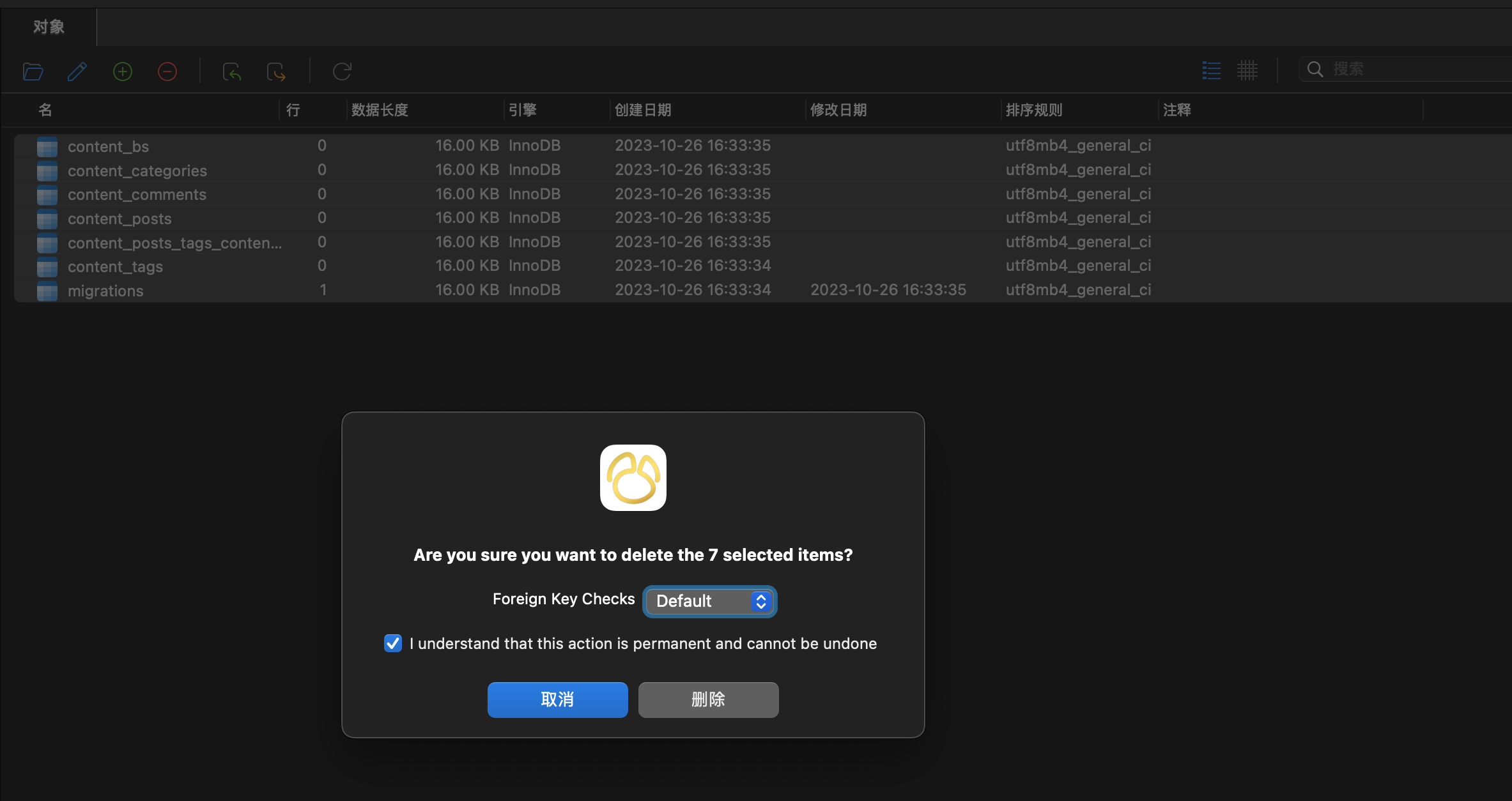 执行命令`pnpm cli dbmg` 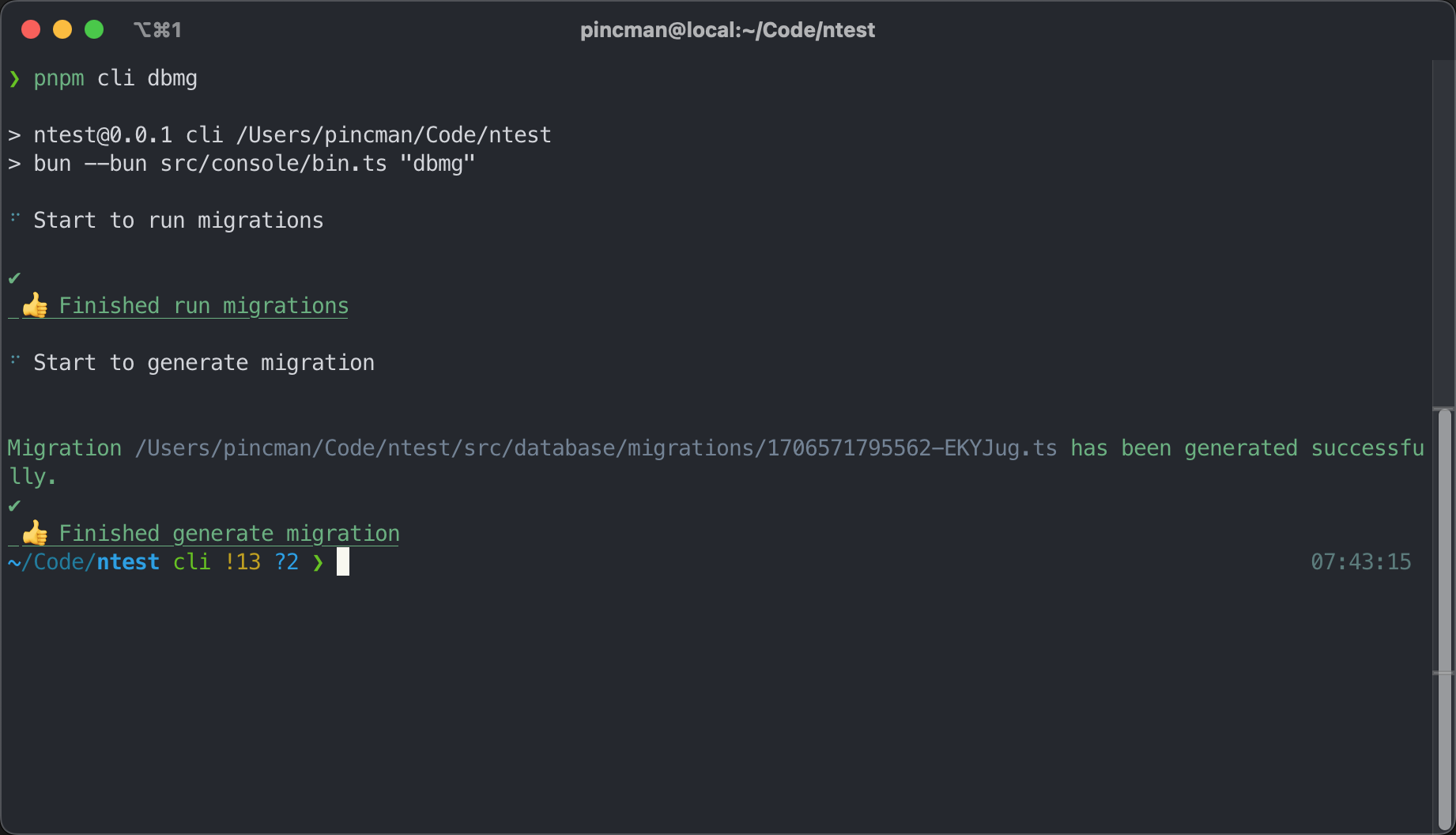 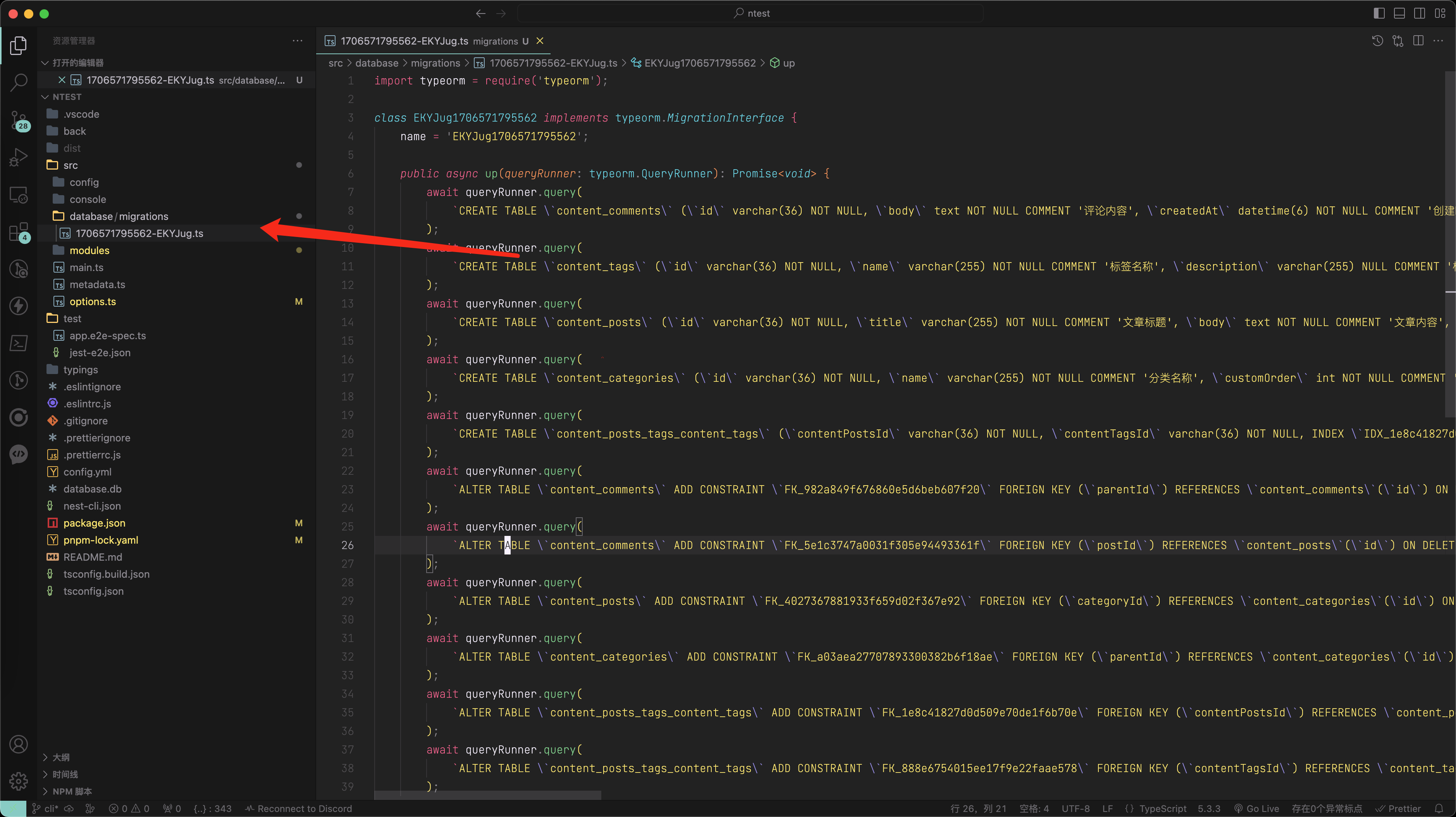 ### 运行迁移[](#运行迁移-1 "运行迁移的直接链接") 执行`pnpm cli dbmr`或者`pnpm cli dbmg -r`运行迁移 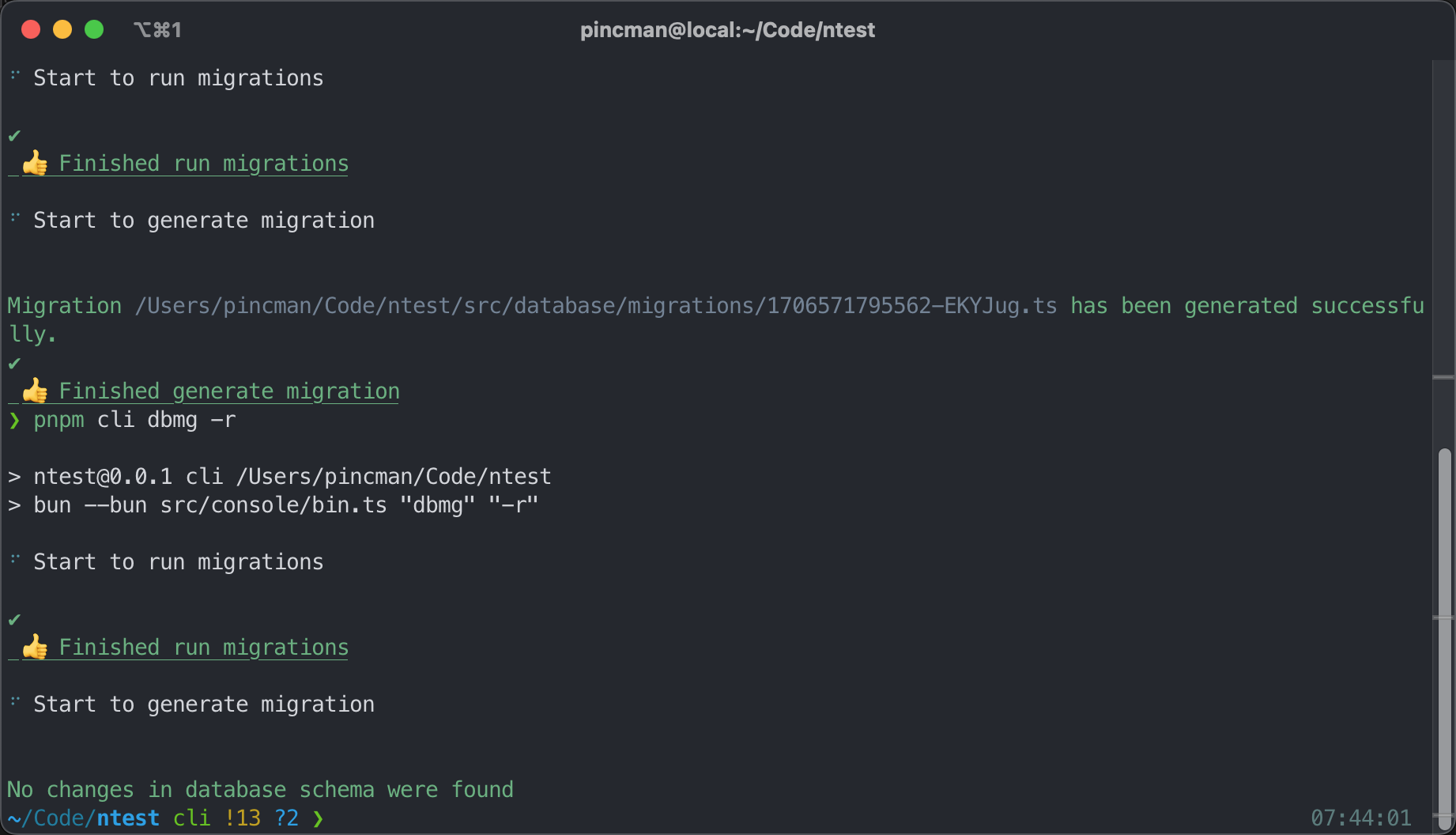 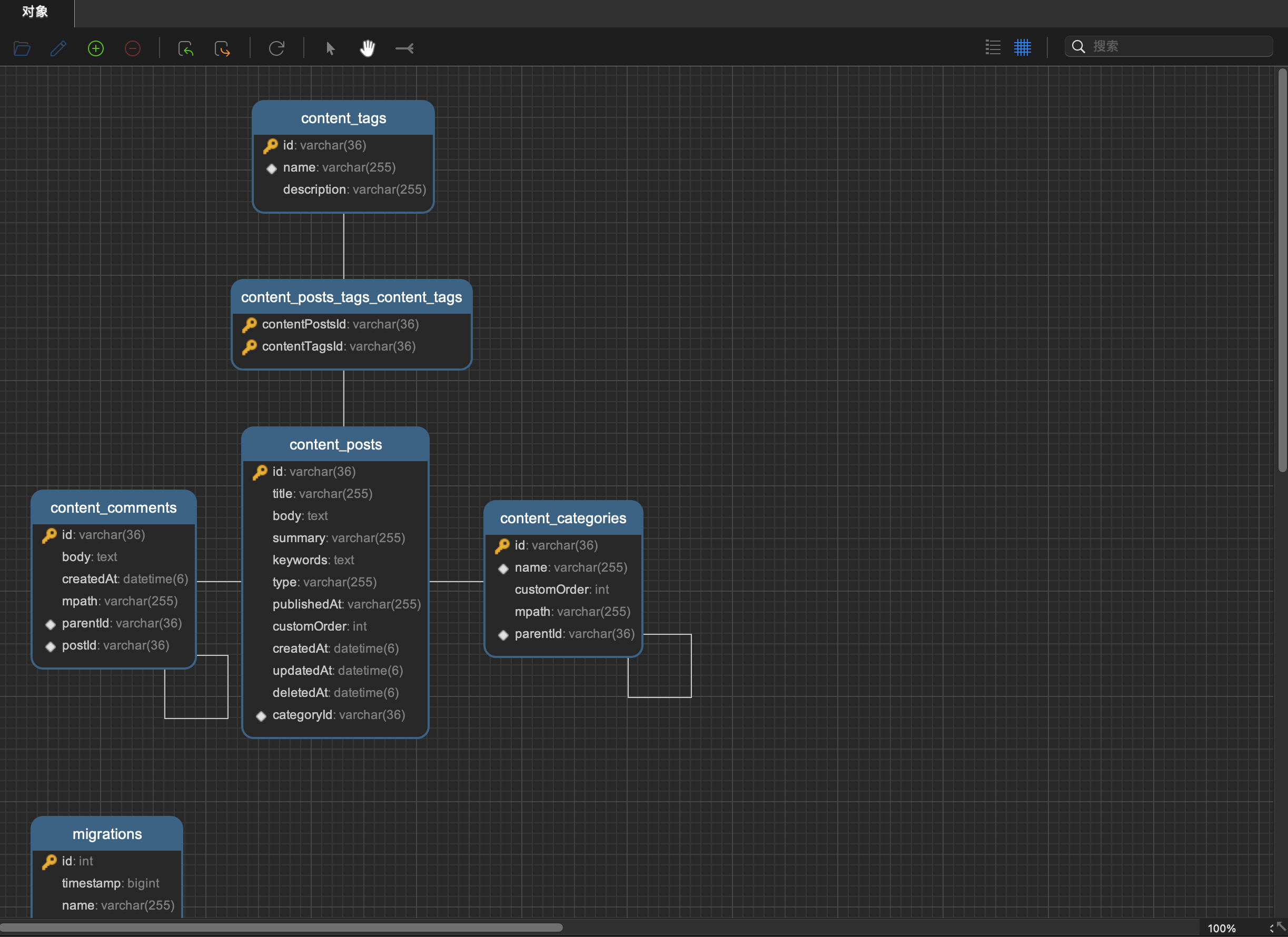 为了程序能在运行时,实现自动迁移我们可以添加一个默认配置 首先,添加一个自动迁移的配置类型 ``` // src/modules/database/types.tstype DbAdditionalOption = { /** * 是否在启动应用后自动运行迁移 */ autoMigrate?: boolean; // ...} ``` 接下来,我们把每个连接的默认自动迁移设置为`true` 注意 不要放到`newOptions.connections`的`deepMerge`里,这样就无法在你不需要自动迁移这个功能时在`config/database.config.ts`进行自定义配置更改了 ``` // src/modules/database/config.tsexport const createDbOptions = (options: DbConfig) => { const newOptions: DbOptions = { common: deepMerge( { charset: 'utf8mb4', logging: ['error'], autoMigrate: true, // ...}; ``` 然后写一个服务,用于在启动应用时遍历每个连接以实现自动运行迁移 信息 此处我们用到了nestjs的`onModuleInit`钩子,具体请查看[此处文档](https://docs.nestjs.com/fundamentals/module-ref) ``` // src/modules/database/resolver/auto-migrate.ts@Injectable()export class AutoMigrate { constructor(private moduleRef: ModuleRef) {} async onModuleInit() { const configure = this.moduleRef.get(Configure, { strict: false }); const { connections = [] }: DbConfig = await configure.get<DbConfig>('database'); for (const connect of connections) { let dataSource: DataSource | undefined; if (connect.autoMigrate) { try { const runner = new TypeormMigrationRun(); dataSource = new DataSource(connect as DataSourceOptions); if (dataSource && dataSource.isInitialized) await dataSource.destroy(); dataSource.setOptions({ subscribers: [], synchronize: false, migrationsRun: false, logging: ['error'], migrations: [ join(connect.paths.migration, '**/*.ts'), join(connect.paths.migration, '**/*.js'), ], dropSchema: false, }); await dataSource.initialize(); await runner.handler({ dataSource, }); } catch (error) { if (dataSource && dataSource.isInitialized) await dataSource.destroy(); panic({ message: 'Run migrations failed!', error }); } } } }} ``` 然后把它放入`DatabaseModule`的`providers`中 ``` // src/modules/database/database.module.ts@Module({})export class DatabaseModule { static async forRoot(configure: Configure) { const providers: ModuleMetadata['providers'] = [ //... AutoMigrate, ]; } ``` 现在我们删除所有数据表结构,并重新启动应用,可以看到表结构会自动生成。并且,如果在`watch`模式下或者`pm2`种运行应用,那么在每次更改代码后都会自动运行一次迁移。**最重要的是:这与`synchronize: true`这种直接同步的方式不同,这是渐进式的修改表结构,是不会影响现有数据的!** 我们可以尝试再次清空表结构,然后启动应用并刷新navicat就可以看到表结构再一次被生成了
peipeo
2026年11月8日 10:34
转发文档
收藏文档
上一篇
下一篇
手机扫码
复制链接
手机扫一扫转发分享
复制链接
Markdown文件
PDF文档(打印)
分享
链接
类型
密码
更新密码