剪藏
Rethinking your position
Learn how to learn
3R编码 | nestjs最佳实践 - 课程概览
3R编码 | Node.js开发环境搭建
3R编码 | Nestjs+Eslint+SWC应用初始化及断点调试
3R编码 | 装饰器与反射
3R编码 | Nestjs核心概念
3R编码 | 无懈可击的Linux服务器构建
3R编码 | 使用Turborepo+pnpm workspaces构建monorepo应用
3R编码 | 使用Gitea+Drone自建CICD平台
3R编码 | 整合Typeorm实现CRUD
3R编码 | 请求数据的验证和响应数据的序列化
3R编码 | 数据关联与树形嵌套结构的分类和评论的实现
3R编码 | 自定义全局的验证管道,拦截器和过滤器
3R编码 | 自定义数据验证约束及约束中的依赖注入
3R编码 | 批量操作及软删除(回收站)功能使用
3R编码 | 数据库与MeiliSearch的全文搜索
3R编码 | 数据操作代码的抽象化
3R编码 | 整合bun与pm2实现开发环境与生产环境免编译和自启
3R编码 | 自建配置系统实现
3R编码 | 嵌套路由与Swagger文档实现
3R编码 | 使用Yargs构建命令行工具
3R编码 | 生产环境下静默启动以及PM2 API的使用
3R编码 | 数据迁移功能的实现
3R编码 | 数据填充命令实现
3R编码 | 用户模块开发以及使用Passport实现JWT认证和无痛刷新
3R编码 | 基于CASL的RBAC动态角色及权限系统实现
3R编码 | 模型动态关联与基于CASL的动态权限的实现
3R编码 | 使用BullMQ实现异步验证短信与邮件发送
3R编码 | WebSocket实现消息广播功能
3R编码 | chapter27
3R编码 | chapter28
3R编码 | TS全栈+AI开发实战 - 课程概览
3R编码 | Node.js环境搭建及应用初始化
3R编码 | Next.js应用初始化
3R编码 | React内置Hooks的使用与自定义详解
3R编码 | Next.js中使用Zustand进行状态管理详解
3R编码 | Next.js核心概念及应用构建
微电子学第1话 MOS Differential Pair (I)
微电子学第1话 MOS Differential Pair (I)
微电子学第3话 CMRR
微电子学第2话 MOS Differential Pair (II)
终于有人讲了,凭什么三极管能放大?
降低人类负担:类型系统即边界
固态变压器SST是什么
本站点使用 MrDoc 构建
-
+
3R编码 | 数据关联与树形嵌套结构的分类和评论的实现
请在开始本课程之前务必通读[typeorm](https://typeorm.io/)官方文档或者也可以阅读[中文文档](https://www.typeorm.org/) - 学会模型(数据表)之间的关联以及关联的CRUD操作 - 学会无限级树形嵌套模型的构建以及树形模型的CRUD操作 因为前面很多节课都是讲内容模块,所以这些课大部分编码工作都是集中于内容模块的,本节课也是如此 在增加分类和评论后的文件结构如下 ``` ./src/modules/content├── constants.ts├── content.module.ts├── controllers│ ├── category.controller.ts│ ├── comment.controller.ts│ ├── index.ts│ ├── post.controller.ts│ └── tag.controller.ts├── dtos│ ├── category.dto.ts│ ├── comment.dto.ts│ ├── index.ts│ ├── post.dto.ts│ └── tag.dto.ts├── entities│ ├── category.entity.ts│ ├── comment.entity.ts│ ├── index.ts│ ├── post.entity.ts│ └── tag.entity.ts├── repositories│ ├── category.repository.ts│ ├── comment.repository.ts│ ├── index.ts│ ├── post.repository.ts│ └── tag.repository.ts├── services│ ├── category.service.ts│ ├── comment.service.ts│ ├── index.ts│ ├── post.service.ts│ ├── sanitize.service.ts│ └── tag.service.ts└── subscribers ├── index.ts └── post.subscriber.ts ``` 我们可以先浏览一下我们的数据模型,了解每个表之间的关联关系 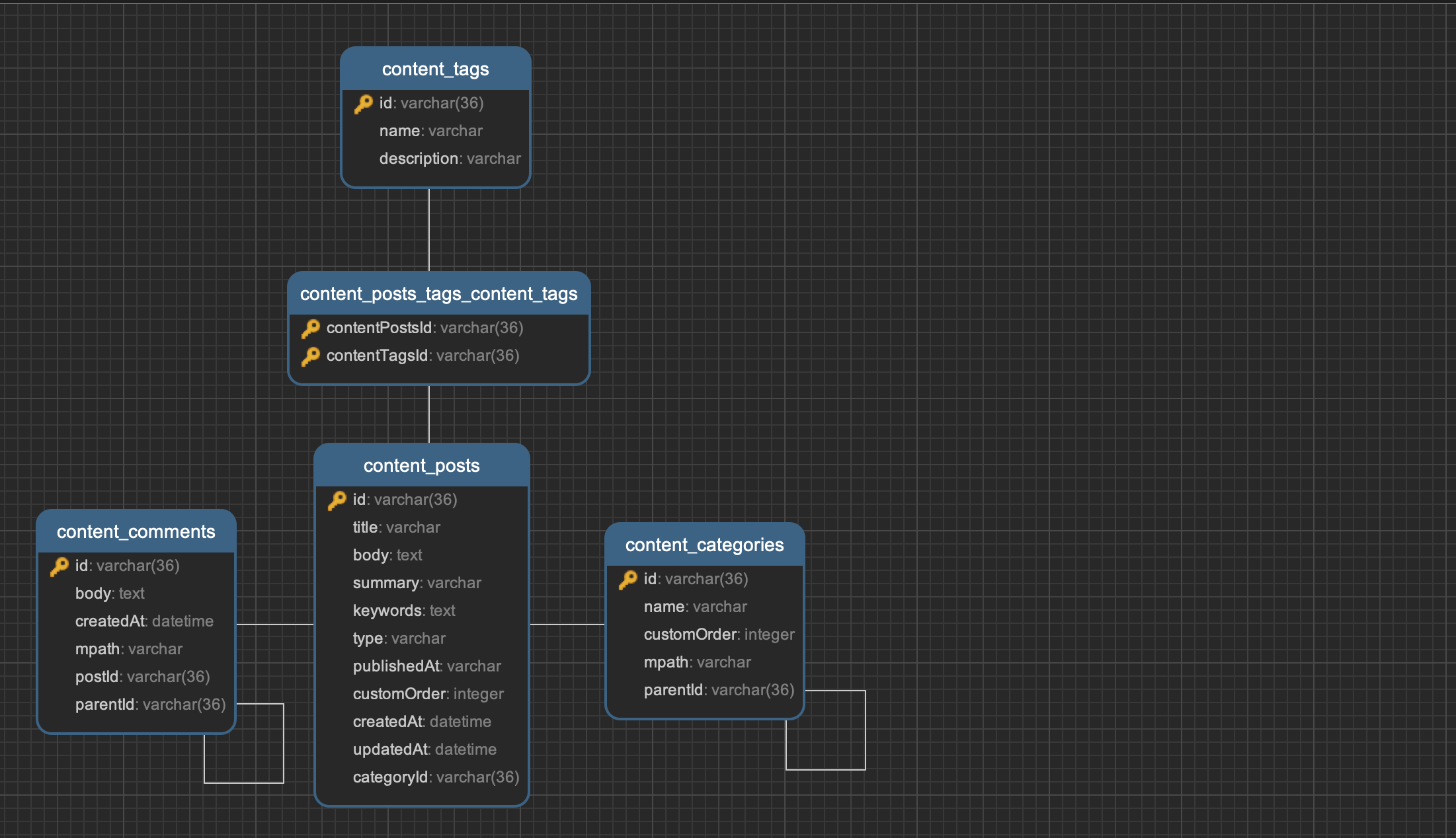 通过上图可以知道,每个表之间的关系如下 - 分类与文章为一对多(one-to-many)的关系,这就意味着一个分类可以拥有多篇文章,一篇文章必定只属于一个分类 - 分类自身为树形嵌套结构 - 标签与文章为多对多(many-to-many)的关系,这就意味着一个标签可以关联多篇文章,一篇文章同时可以关联多个标签 - 文章与评论为一对多(one-to-many)的关系,这就意味着一篇文章可以拥有多条评论,一个评论必定只属于一篇文章 - 评论自身为树形嵌套结构 下面我们看下如果使用代码去实现 在编码流程上我们仍然遵循前面章节讲的流程,也就是从模型开始 ### 模型[](#模型 "模型的直接链接") 首先我们添加`CategoryEntity`来构建分类表,可以看到如下字段 ``` // src/modules/content/entities/category.entity.tsimport { BaseEntity, Column, Entity, PrimaryColumn } from 'typeorm';@Entity('content_categories')export class CategoryEntity extends BaseEntity { @PrimaryColumn({ type: 'varchar', generated: 'uuid', length: 36 }) id: string; @Column({ comment: '分类名称', unique: true }) name: string; @Column({ comment: '分类排序', default: 0 }) customOrder: number;} ``` 再添加一个`TagEntity`用于构建标签表 ``` // src/modules/content/entities/tag.entity.ts@Entity('content_tags')export class TagEntity { @PrimaryColumn({ type: 'varchar', generated: 'uuid', length: 36 }) id: string; @Column({ comment: '标签名称', unique: true }) name: string; @Column({ comment: '标签描述', nullable: true }) description?: string;} ``` 最后增加一个`CommentEntity`用于构建评论表 ``` // src/modules/content/entities/comment.entity.ts@Entity('content_comments')export class CommentEntity extends BaseEntity { @PrimaryColumn({ type: 'varchar', generated: 'uuid', length: 36 }) id: string; @Column({ comment: '评论内容', type: 'text' }) body: string; @CreateDateColumn({ comment: '创建时间', }) createdAt: Date;} ``` #### 关联实现[](#关联实现 "关联实现的直接链接") 提示 注意: 此处的`Relation<xxx>`与前面的`WrapperType<xxx>`一样,用于防止swc下的循环依赖报错 需要注意的是,正如typeorm官网文档里说的一样,在定义反向关系的时候我们需要遵循以下规则 - 多对多关联时,关联的一侧(比如这里的`PostEntity`的`tags`)必须加上`@JoinTable`装饰器 - 一对多关联时(反向关联为多对一),两侧都不需要加任何东西,比如这里的`PostEntity`和`TagEntity`,`PostEntity`和`CommentEntity` - 一对一关联时(本节课没用到),关联的一侧必须要加上`@JoinColumn`装饰器 ``` // src/modules/content/entities/category.entity.ts@Entity('content_categories')export class CategoryEntity extends BaseEntity { // ... @OneToMany(() => PostEntity, (post) => post.category, { cascade: true, }) posts: Relation<PostEntity[]>;}// src/modules/content/entities/tag.entity.ts@Entity('content_tags')export class TagEntity { //... @ManyToMany(() => PostEntity, (post) => post.tags) posts: Relation<PostEntity[]>;}@Entity('content_comments')export class CommentEntity extends BaseEntity { // ... @ManyToOne(() => PostEntity, (post) => post.comments, { // 文章不能为空 nullable: false, // 跟随父表删除与更新 onDelete: 'CASCADE', onUpdate: 'CASCADE', }) post: Relation<PostEntity>;}// src/modules/content/entities/post.entity.tsexport class PostEntity extends BaseEntity { // ... @Expose() @ManyToOne(() => CategoryEntity, (category) => category.posts, { nullable: true, onDelete: 'SET NULL', }) category: Relation<CategoryEntity> @Expose() @ManyToMany(() => TagEntity, (tag) => tag.posts, { cascade: true, }) @JoinTable() tags: Relation<TagEntity>[]; @OneToMany(() => CommentEntity, (comment) => comment.post, { cascade: true, }) comments: Relation<CommentEntity>[];} ``` #### cascade机制[](#cascade机制 "cascade机制的直接链接") 可以看到我们在文章一侧的`@OneToMany`的第三个选项参数中加入了`cascade`,这会在我们操作文章时可以触发一些额外的action 它可以是一个字符串数组,支持`("insert" | "update" | "remove" | "soft-remove" | "recover")[]`这些action,如果设置为`true`而不是一个字符串数组的话,那么默认包含全部action,这些所谓的action会出现如下作用,比如 - `insert` action会在你创建文章时,如果添加一些没有保存到数据库的分类模型对象,那么这些分类会自动在保存文章时被保存到数据库 - `update`action会在你更新文章时,同样的会把没有保存到数据库的分类,在添加到文章对象时保存进数据库 - `remove`action一般用在一对一或者一对多关联,比如在你删除文章时同时删除文章下的评论 - `soft-remove`和`recover`是用于软删除和恢复的,这部分内容我们会留到后面的课时再讲 同时在`casecade`的另一侧,比如`CategoryEntity`的`posts`的上,或者`CommentEntity`的`post`上,他们的关联装饰器中可以设置`OnDelete`或者`OnUpdate`的操作以对应`casecade`,默认为`CASCADE` 比如我们在删除文章时,可以把评论一侧的`OnDelete`给设置为`CASCADE`,这样的话在删除文章时会自动删除它下面关联的所有评论。也可以设置成`SET NULL`,比如删除分类时,分类下的文章不删除,所以把它的分类设置为`null`,也就是无分类文章 #### 树形嵌套[](#树形嵌套 "树形嵌套的直接链接") 什么是树形嵌套? 我们可以想象一下,比如在浏览一些商城网站时,他的分类可以有很多子分类,一个子分类下又会有很多子分类,这样可以无限级下去 比如如下结构 ``` category1 sub-category1 sub-sub-category1category2 sub-category2 ``` 很多同学一开始可能会直接使用递归去实现这个,但是这样会非常影响程序的性能,而Typeorm默认是支持这种模型的,并且有四种方法去实现无限级嵌套 但是经过站长对Typeorm长期使用之后发觉除了Materialized Path(物理路径)外的其它三种实现多多少少会有些坑,所以一般我们使用MP方式去实现,代码如下 ``` // src/modules/content/entities/category.entity.ts@Tree('materialized-path')@Entity('content_categories')export class CategoryEntity extends BaseEntity { // ... depth = 0; @TreeParent({ onDelete: 'NO ACTION' }) parent: Relation<CategoryEntity> | null; @TreeChildren({ cascade: true }) children: Relation<CategoryEntity>[];}// src/modules/content/entities/comment.entity.ts@Tree('materialized-path')@Entity('content_comments')export class CommentEntity extends BaseEntity { // ... depth = 0; @TreeParent({ onDelete: 'CASCADE' }) parent: Relation<CommentEntity> | null; @TreeChildren({ cascade: true }) children: Relation<CommentEntity>[];} ``` 可以看到我们添加了 1. 在模型顶部添加`@Tree`装饰器,并且传入`materialized-path`,这就构建了一个MP的树形嵌套结构 2. 添加了`parent`和`children`字段,并为他们添加上`@TreeParent`和`@TreeChildren`装饰器,代表父节点和子节点 3. 因为顶级节点是没有父级节点的,所以它们的父节点是`null`,也就是我们的`parent`属性可以是`null` 4. 正如前面讲到的`cascade`,在我们的子节点上加上`cascade`为`true` 5. 因为我们需要在删除父分类时,子分类会提升一级,而不是直接被删除或者变成顶级分类。所以这里暂时不进行任何操作,这个功能我们在服务类中去实现。于是我们把`onDelete`设置成`NO ACTION` 6. 在删除父评论时,我们把这条评论的子孙评论一并删除,所以把`oneDelete`设置成`CASCADE` 7. 给`CategoryEntity`和`CommentEntity`都添加一个虚拟字段`depth`,我们在查询节点的分页数据时用来代表节点深度 #### 序列化设置[](#序列化设置 "序列化设置的直接链接") 接下来我们像上一节课一样,给`CategoryEntity`做一下序列化配置。 其中`category-tree`代表在直接查询这个分类树的时候显示的字段,而`category-list`代表在查询打平树并且分页后的数据时显示的字段 警告 注意,对于嵌套类型字段(比如一对多关联的其他模型或者树形嵌套的`children`)的序列化,需要添加上`@Type`装饰器 ``` // src/modules/content/entities/category.entity.ts@Exclude()@Tree('materialized-path')@Entity('content_categories')export class CategoryEntity extends BaseEntity { @Expose() @PrimaryColumn({ type: 'varchar', generated: 'uuid', length: 36 }) id: string; @Expose() @Column({ comment: '分类名称', unique: true }) name: string; @Expose({ groups: ['category-tree', 'category-list', 'category-detail'] }) @Column({ comment: '分类排序', default: 0 }) customOrder: number; @Expose({ groups: ['category-list'] }) depth = 0; @Expose({ groups: ['category-detail', 'category-list'] }) @TreeParent({ onDelete: 'NO ACTION' }) parent: Relation<CategoryEntity> | null; @Expose({ groups: ['category-tree'] }) @Type(() => CategoryEntity) @TreeChildren({ cascade: true }) children: Relation<CategoryEntity>[]; @OneToMany(() => PostEntity, (post) => post.category, { cascade: true, }) posts: Relation<PostEntity[]>;} ``` 同样地,给`TagEntity`与`CommentEntity`添加序列化配置,并修改`PostEntity`的序列化配置,就不再赘述了 - `TagEntity`中的`postCount`字段是一个动态生成的统计文章数量的虚拟字段 - `PostEntity`中的`commentCount`字段是一个动态生成的统计评论数量的虚拟字段 ``` // src/modules/content/entities/tag.entity.ts@Exclude()@Entity('content_tags')export class TagEntity { @Expose() @PrimaryColumn({ type: 'varchar', generated: 'uuid', length: 36 }) id: string; @Expose() @Column({ comment: '标签名称', unique: true }) name: string; @Expose() @Column({ comment: '标签描述', nullable: true }) description?: string; /** * 通过queryBuilder生成的文章数量(虚拟字段) */ @Expose() postCount: number; @ManyToMany(() => PostEntity, (post) => post.tags) posts: Relation<PostEntity[]>;}// src/modules/content/entities/comment.entity.ts@Exclude()@Tree('materialized-path')@Entity('content_comments')export class CommentEntity extends BaseEntity { @Expose() @PrimaryColumn({ type: 'varchar', generated: 'uuid', length: 36 }) id: string; @Expose() @Column({ comment: '评论内容', type: 'text' }) body: string; @Expose() @Type(() => Date) @CreateDateColumn({ comment: '创建时间', }) createdAt: Date; @Expose({ groups: ['comment-list'] }) depth = 0; @Expose({ groups: ['comment-detail', 'comment-list'] }) @TreeParent({ onDelete: 'CASCADE' }) parent: Relation<CommentEntity> | null; @Expose({ groups: ['comment-tree'] }) @Type(() => CommentEntity) @TreeChildren({ cascade: true }) children: Relation<CommentEntity>[]; @Expose() @ManyToOne(() => PostEntity, (post) => post.comments, { // 文章不能为空 nullable: false, // 跟随父表删除与更新 onDelete: 'CASCADE', onUpdate: 'CASCADE', }) post: Relation<PostEntity>;}// src/modules/content/entities/post.entity.ts@Exclude()@Entity('content_posts')export class PostEntity extends BaseEntity { @Expose() @PrimaryColumn({ type: 'varchar', generated: 'uuid', length: 36 }) id: string; @Expose() @Column({ comment: '文章标题' }) title: string; @Expose({ groups: ['post-detail'] }) @Column({ comment: '文章内容', type: 'text' }) body: string; @Expose() @Column({ comment: '文章描述', nullable: true }) summary?: string; @Expose() @Column({ comment: '关键字', type: 'simple-array', nullable: true }) keywords?: string[]; @Expose() @Column({ comment: '文章类型', type: 'varchar', // 如果是mysql或者postgresql你可以使用enum类型 // enum: PostBodyType, default: PostBodyType.MD, }) type: PostBodyType; @Expose() @Column({ comment: '发布时间', type: 'varchar', nullable: true, }) publishedAt?: Date | null; @Expose() @Column({ comment: '自定义文章排序', default: 0 }) customOrder: number; @Expose() @Type(() => Date) @CreateDateColumn({ comment: '创建时间', }) createdAt: Date; @Expose() @Type(() => Date) @UpdateDateColumn({ comment: '更新时间', }) updatedAt: Date; /** * 通过queryBuilder生成的评论数量(虚拟字段) */ @Expose() commentCount: number; @Expose() @ManyToOne(() => CategoryEntity, (category) => category.posts, { nullable: true, onDelete: 'SET NULL', }) category: CategoryEntity; @Expose() @Type(() => TagEntity) @ManyToMany(() => TagEntity, (tag) => tag.posts, { cascade: true, }) @JoinTable() tags: Relation<TagEntity>[]; @OneToMany(() => CommentEntity, (comment) => comment.post, { cascade: true, }) comments: Relation<CommentEntity>[];} ``` ### 存储类[](#存储类 "存储类的直接链接") 树形模型的自定义Repository需要继承`TreeRepository`,同时由于目前typeorm的`TreeRepository`中的所有查询方法均不支持传入自定义参数,所以我们可以重载其默认的方法来进行一些修改,这需要我们去查看这个基类的源代码,其源码在[这里](https://github.com/typeorm/typeorm/blob/master/src/repository/TreeRepository.ts) #### 分类存储类[](#分类存储类 "分类存储类的直接链接") - 添加一个用于构建基础查询器的`buildBaseQB`,用于在查询分类时把它关联的父分类也顺带查询进去 - 重载`findRoots`,`createDescendantsQueryBuilder`以及`createAncestorsQueryBuilder`,这样就可以在查询顶级分类,子孙分类和祖先分类时,使用自定义的`customOrder`进行升序排序了 下面是我们对父类的`TreeRepository`继承后做的一些修改 提示 需要注意的是,大部分代码均来自于`TreeRepository`本身的源代码。我们只是继承下来,对一些方法稍作修改 ``` // src/modules/content/repositories/category.repository.ts@CustomRepository(CategoryEntity)export class CategoryRepository extends TreeRepository<CategoryEntity> { /** * 构建基础查询器 */ buildBaseQB() { return this.createQueryBuilder('category').leftJoinAndSelect('category.parent', 'parent'); } /** * 树形结构查询 * @param options */ async findTrees(options?: FindTreeOptions) { const roots = await this.findRoots(options); await Promise.all(roots.map((root) => this.findDescendantsTree(root, options))); return roots; } /** * 查询顶级分类 * @param options */ findRoots(options?: FindTreeOptions) { const escapeAlias = (alias: string) => this.manager.connection.driver.escape(alias); const escapeColumn = (column: string) => this.manager.connection.driver.escape(column); const joinColumn = this.metadata.treeParentRelation!.joinColumns[0]; const parentPropertyName = joinColumn.givenDatabaseName || joinColumn.databaseName; const qb = this.buildBaseQB().orderBy('category.customOrder', 'ASC'); FindOptionsUtils.applyOptionsToTreeQueryBuilder(qb, options); return qb .where(`${escapeAlias('category')}.${escapeColumn(parentPropertyName)} IS NULL`) .getMany(); } /** * 查询后代分类 * @param entity * @param options */ findDescendants(entity: CategoryEntity, options?: FindTreeOptions) { const qb = this.createDescendantsQueryBuilder('category', 'treeClosure', entity); FindOptionsUtils.applyOptionsToTreeQueryBuilder(qb, options); qb.orderBy('category.customOrder', 'ASC'); return qb.getMany(); } /** * 查询祖先分类 * @param entity * @param options */ findAncestors(entity: CategoryEntity, options?: FindTreeOptions) { const qb = this.createAncestorsQueryBuilder('category', 'treeClosure', entity); FindOptionsUtils.applyOptionsToTreeQueryBuilder(qb, options); qb.orderBy('category.customOrder', 'ASC'); return qb.getMany(); } /** * 查询后代树 * @param entity * @param options */ async findDescendantsTree(entity: CategoryEntity, options?: FindTreeOptions) { const qb = this.createDescendantsQueryBuilder('category', 'treeClosure', entity) .leftJoinAndSelect('category.parent', 'parent') .orderBy('category.customOrder', 'ASC'); FindOptionsUtils.applyOptionsToTreeQueryBuilder(qb, pick(options, ['relations', 'depth'])); const entities = await qb.getRawAndEntities(); const relationMaps = TreeRepositoryUtils.createRelationMaps( this.manager, this.metadata, 'category', entities.raw, ); TreeRepositoryUtils.buildChildrenEntityTree( this.metadata, entity, entities.entities, relationMaps, { depth: -1, ...pick(options, ['relations']), }, ); return entity; } /** * 查询祖先树 * @param entity * @param options */ async findAncestorsTree(entity: CategoryEntity, options?: FindTreeOptions) { const qb = this.createAncestorsQueryBuilder('category', 'treeClosure', entity) .leftJoinAndSelect('category.parent', 'parent') .orderBy('category.customOrder', 'ASC'); FindOptionsUtils.applyOptionsToTreeQueryBuilder(qb, options); const entities = await qb.getRawAndEntities(); const relationMaps = TreeRepositoryUtils.createRelationMaps( this.manager, this.metadata, 'category', entities.raw, ); TreeRepositoryUtils.buildParentEntityTree( this.metadata, entity, entities.entities, relationMaps, ); return entity; } /** * 统计后代元素数量 * @param entity */ async countDescendants(entity: CategoryEntity) { const qb = this.createDescendantsQueryBuilder('category', 'treeClosure', entity); return qb.getCount(); } /** * 统计祖先元素数量 * @param entity */ async countAncestors(entity: CategoryEntity) { const qb = this.createAncestorsQueryBuilder('category', 'treeClosure', entity); return qb.getCount(); } /** * 打平并展开树 * @param trees * @param depth * @param parent */ async toFlatTrees(trees: CategoryEntity[], depth = 0, parent: CategoryEntity | null = null) { const data: Omit<CategoryEntity, 'children'>[] = []; for (const item of trees) { item.depth = depth; item.parent = parent; const { children } = item; unset(item, 'children'); data.push(item); data.push(...(await this.toFlatTrees(children, depth + 1, item))); } return data as CategoryEntity[]; }} ``` 因为分类是树形结构,没法使用`QueryBuilder`通过查询的方式直接进行分页,所以我们必须把所有的整棵树查出来,然后把它们进行扁平化处理,也就是“打平后”才能进行分页 比如把前面分类的结构变成这样 ``` category1- sub-category1-- sub-sub-category1category2- sub-category2 ``` 这时候我们首先要扁平化处理变成 ``` category1sub-category1sub-sub-category1category2sub-category2 ``` 同时要为代表分类的深度`depth`虚拟属性赋值,然后前端可以通过repeat几个(根据depth)`-`的方式来生成上面的结构,所以我们编写一个`toFlatTrees`方法,用于递归打平树,并且给每个分类赋值`depth` #### 评论存储类[](#评论存储类 "评论存储类的直接链接") 评论存储类与分类存储大同小异,一般情况下在后台管理评论时我们只需要查出所有的评论树然后打平分页就可以,但是在前台查看一篇文章的时候,这需要查看该篇文章下的评论,这时候我们需要加一个额外的查询,所以我们重载一些方法来添加一个额外的`addQuery`选项 ``` // src/modules/content/repositories/comment.repository.tstype FindCommentTreeOptions = FindTreeOptions & { addQuery?: (query: SelectQueryBuilder<CommentEntity>) => SelectQueryBuilder<CommentEntity>;};@CustomRepository(CommentEntity)export class CommentRepository extends TreeRepository<CommentEntity> { /** * 构建基础查询器 */ buildBaseQB(qb: SelectQueryBuilder<CommentEntity>): SelectQueryBuilder<CommentEntity> { return qb .leftJoinAndSelect(`comment.parent`, 'parent') .leftJoinAndSelect(`comment.post`, 'post') .orderBy('comment.createdAt', 'DESC'); } /** * 查询树 * @param options */ async findTrees(options: FindCommentTreeOptions = {}) { options.relations = ['parent', 'children']; const roots = await this.findRoots(options); await Promise.all(roots.map((root) => this.findDescendantsTree(root, options))); return roots; } /** * 查询顶级评论 * @param options */ findRoots(options: FindCommentTreeOptions = {}) { const { addQuery, ...rest } = options; const escapeAlias = (alias: string) => this.manager.connection.driver.escape(alias); const escapeColumn = (column: string) => this.manager.connection.driver.escape(column); const joinColumn = this.metadata.treeParentRelation!.joinColumns[0]; const parentPropertyName = joinColumn.givenDatabaseName || joinColumn.databaseName; let qb = this.buildBaseQB(this.createQueryBuilder('comment')); FindOptionsUtils.applyOptionsToTreeQueryBuilder(qb, rest); qb.where(`${escapeAlias('comment')}.${escapeColumn(parentPropertyName)} IS NULL`); qb = addQuery ? addQuery(qb) : qb; return qb.getMany(); } /** * 创建后代查询器 * @param closureTableAlias * @param entity * @param options */ createDtsQueryBuilder( closureTableAlias: string, entity: CommentEntity, options: FindCommentTreeOptions = {}, ): SelectQueryBuilder<CommentEntity> { const { addQuery } = options; const qb = this.buildBaseQB( super.createDescendantsQueryBuilder('comment', closureTableAlias, entity), ); return addQuery ? addQuery(qb) : qb; } /** * 查询后代树 * @param entity * @param options */ async findDescendantsTree( entity: CommentEntity, options: FindCommentTreeOptions = {}, ): Promise<CommentEntity> { const qb: SelectQueryBuilder<CommentEntity> = this.createDtsQueryBuilder( 'treeClosure', entity, options, ); FindOptionsUtils.applyOptionsToTreeQueryBuilder(qb, pick(options, ['relations', 'depth'])); const entities = await qb.getRawAndEntities(); const relationMaps = TreeRepositoryUtils.createRelationMaps( this.manager, this.metadata, 'comment', entities.raw, ); TreeRepositoryUtils.buildChildrenEntityTree( this.metadata, entity, entities.entities, relationMaps, { depth: -1, ...pick(options, ['relations']), }, ); return entity; } /** * 打平并展开树 * @param trees * @param depth */ async toFlatTrees(trees: CommentEntity[], depth = 0) { const data: Omit<CommentEntity, 'children'>[] = []; for (const item of trees) { item.depth = depth; const { children } = item; unset(item, 'children'); data.push(item); data.push(...(await this.toFlatTrees(children, depth + 1))); } return data as CommentEntity[]; }} ``` #### 文章存储类[](#文章存储类 "文章存储类的直接链接") 在查询文章时一般我们需要显示评论数量以及其关联的分类,所以需要修改`PostRepository` 评论数量是通过添加一个子查询把该篇文章关联的评论的数量先通过`select`查询出来,然后通过`loadRelationCountAndMap`映射到该篇文章的`commentCount`虚拟字段上 备注 请注意`loadRelationCountAndMap`暂时Typeorm官方没有给出文档,需要通过`issue`才能找到该解决方案 ``` // src/modules/content/repositories/post.repository.ts@CustomRepository(PostEntity)export class PostRepository extends Repository<PostEntity> { buildBaseQB() { // 在查询之前先查询出评论数量在添加到commentCount字段上 return this.createQueryBuilder('post') .leftJoinAndSelect('post.category', 'category') .leftJoinAndSelect('post.tags', 'tags') .addSelect((subQuery) => { return subQuery .select('COUNT(c.id)', 'count') .from(CommentEntity, 'c') .where('c.post.id = post.id'); }, 'commentCount') .loadRelationCountAndMap('post.commentCount', 'post.comments'); }} ``` #### 标签存储类[](#标签存储类 "标签存储类的直接链接") 与文章存储类类似,不再赘述 ``` // src/modules/content/repositories/tag.repository.ts@CustomRepository(TagEntity)export class TagRepository extends Repository<TagEntity> { buildBaseQB() { return this.createQueryBuilder('tag') .leftJoinAndSelect('tag.posts', 'posts') .addSelect( (subQuery) => subQuery.select('COUNT(p.id)', 'count').from(PostEntity, 'p'), 'postCount', ) .orderBy('postCount', 'DESC') .loadRelationCountAndMap('tag.postCount', 'tag.posts'); }} ``` ### DTO[](#dto "DTO的直接链接") #### 文章DTO[](#文章dto "文章DTO的直接链接") 更改文章的几个DTO,使其能在查询时通过分类来过滤,并且在创建或更新文章时可以添加或修改关联的分类以及标签 信息 分类和标签是以ID的方式传进去的 ``` // src/modules/content/dtos/post.dto.tsexport class QueryPostDto implements PaginateOptions { // ... @IsUUID(undefined, { message: 'ID格式错误' }) @IsOptional() category?: string; @IsUUID(undefined, { message: 'ID格式错误' }) @IsOptional() tag?: string;}export class CreatePostDto { // ... @IsUUID(undefined, { always: true, message: 'ID格式错误', }) @IsOptional({ always: true }) category?: string; /** * 根据标签ID查询 */ @IsUUID(undefined, { always: true, each: true, message: 'ID格式错误', }) @IsOptional({ always: true }) tags?: string[];} ``` 同时添加一下分类,标签和评论的DTO 信息 由于评论没有更新这一功能,所以不需要UpdateDTO #### 分类DTO[](#分类dto "分类DTO的直接链接") `@ValidateIf`是条件验证,在这里的作用是用于在添加或修改分类时,有指定父分类ID,且不为`null`时才进行验证 ``` // src/modules/content/dtos/category.dto.tsexport class QueryCategoryDto implements PaginateOptions { @Transform(({ value }) => toNumber(value)) @Min(1, { message: '当前页必须大于1' }) @IsNumber() @IsOptional() page = 1; @Transform(({ value }) => toNumber(value)) @Min(1, { message: '每页显示数据必须大于1' }) @IsNumber() @IsOptional() limit = 10;}/** * 分类新增验证 */export class CreateCategoryDto { @MaxLength(25, { always: true, message: '分类名称长度不得超过$constraint1', }) @IsNotEmpty({ groups: ['create'], message: '分类名称不得为空' }) @IsOptional({ groups: ['update'] }) name: string; @IsUUID(undefined, { always: true, message: '父分类ID格式不正确' }) @ValidateIf((value) => value.parent !== null && value.parent) @IsOptional({ always: true }) @Transform(({ value }) => (value === 'null' ? null : value)) parent?: string; @Transform(({ value }) => toNumber(value)) @Min(0, { always: true, message: '排序值必须大于0' }) @IsNumber(undefined, { always: true }) @IsOptional({ always: true }) customOrder?: number = 0;}/** * 分类更新验证 */export class UpdateCategoryDto extends PartialType(CreateCategoryDto) { @IsUUID(undefined, { groups: ['update'], message: 'ID格式错误' }) @IsDefined({ groups: ['update'], message: 'ID必须指定' }) id: string;} ``` #### 标签DTO[](#标签dto "标签DTO的直接链接") 标签的验证比较简单 ``` //src/modules/content/dtos/tag.dto.ts/** * 标签分页查询验证 */export class QueryTagDto implements PaginateOptions { @Transform(({ value }) => toNumber(value)) @Min(1, { message: '当前页必须大于1' }) @IsNumber() @IsOptional() page = 1; @Transform(({ value }) => toNumber(value)) @Min(1, { message: '每页显示数据必须大于1' }) @IsNumber() @IsOptional() limit = 10;}/** * 标签创建验证 */export class CreateTagDto { @MaxLength(255, { always: true, message: '标签名称长度最大为$constraint1', }) @IsNotEmpty({ groups: ['create'], message: '标签名称必须填写' }) @IsOptional({ groups: ['update'] }) name: string; @MaxLength(500, { always: true, message: '标签描述长度最大为$constraint1', }) @IsOptional({ always: true }) description?: string;}/** * 标签更新验证 */export class UpdateTagDto extends PartialType(CreateTagDto) { @IsUUID(undefined, { groups: ['update'], message: 'ID格式错误' }) @IsDefined({ groups: ['update'], message: 'ID必须指定' }) id: string;} ``` #### 评论DTO[](#评论dto "评论DTO的直接链接") `QueryCommentTreeDto`在于因为查询评论树不需要分页,所以传入文章ID就可以 ``` // src/modules/content/dtos/comment.dto.ts/** * 评论分页查询验证 */export class QueryCommentDto implements PaginateOptions { @IsUUID(undefined, { message: 'ID格式错误' }) @IsOptional() post?: string; @Transform(({ value }) => toNumber(value)) @Min(1, { message: '当前页必须大于1' }) @IsNumber() @IsOptional() page = 1; @Transform(({ value }) => toNumber(value)) @Min(1, { message: '每页显示数据必须大于1' }) @IsNumber() @IsOptional() limit = 10;}/** * 评论树查询 */export class QueryCommentTreeDto extends PickType(QueryCommentDto, ['post']) {}/** * 评论添加验证 */export class CreateCommentDto { @MaxLength(1000, { message: '评论内容不能超过$constraint1个字' }) @IsNotEmpty({ message: '评论内容不能为空' }) body: string; @IsUUID(undefined, { message: 'ID格式错误' }) @IsDefined({ message: 'ID必须指定' }) post: string; @IsUUID(undefined, { always: true, message: 'ID格式错误' }) @ValidateIf((value) => value.parent !== null && value.parent) @IsOptional({ always: true }) @Transform(({ value }) => (value === 'null' ? null : value)) parent?: string;} ``` ### 服务类[](#服务类 "服务类的直接链接") 在开始编写服务之前我们先编写一个用于树形结构查询的分页函数 提示 因为树形结构需要查询出来后再分页,所以我们不需要传入queryBuilder ``` // src/modules/database/helpers.ts// .../** * 数据手动分页函数 * @param options 分页选项 * @param data 数据列表 */export function treePaginate<E extends ObjectLiteral>( options: PaginateOptions, data: E[],): PaginateReturn<E> { const { page, limit } = options; let items: E[] = []; const totalItems = data.length; const totalRst = totalItems / limit; const totalPages = totalRst > Math.floor(totalRst) ? Math.floor(totalRst) + 1 : Math.floor(totalRst); let itemCount = 0; if (page <= totalPages) { itemCount = page === totalPages ? totalItems - (totalPages - 1) * limit : limit; const start = (page - 1) * limit; items = data.slice(start, start + itemCount); } return { meta: { itemCount, totalItems, perPage: limit, totalPages, currentPage: page, }, items, };} ``` #### 分类服务[](#分类服务 "分类服务的直接链接") 分类服务几个方法如下代码 - `findTrees`用于直接查询出整棵分类树 - `paginate`用于查询出分类数据打平后手动分页 - `detail`用于查询一个分类的信息详情 - `create`用于创建分类。创建分类时,父分类是无法直接作为一个ID保存的,所以其父分类的实例由`getParent`方法获取,设置父分类的逻辑如下 1. 当父分类为`undefined`时则不设置,可以看到模型类: 如果我们不设置的话,默认就是`null`(即顶级分类) 2. 当父分类为`null`时也是顶级分类 3. 当父分类为一个分类模型的实例时则设置父分类 - `update`方法用于更新分类。 更新分类时,父分类同样是通过`getParent`获取,但是只有在这些情况下才会更新父分类 信息 注意`null`和`undefined`情况的区别: 只有父分类不为undefined的情况下才会更新(而父分类为`null`则代表该分类将成为顶级分类) 1. 传入了父分类的ID且该父分类存在,并且该分类原本也有一个父分类,新的父分类和原本的父分类不是同一个分类 2. 传入了父分类的ID且该父分类存在,但该类原本没有父分类(即顶级分类)的情况下 3. 传入了父分类,但是ID为null,但是该分类原本有父分类的情况下(即把该分类提升为顶级分类) - `delete`为删除分类。删除一个分类前会先把它的子分类提升一级,这就与我们前面`CategoryEntity`这个模型中的`@TreeParent({ onDelete: 'NO ACTION' })`对应起来了 `getParent`方法用于根据传入的当前分类的父分类ID以及即将更新的新父分类的ID来获取新父分类的实例 有两种场景 - 在创建分类时,当前分类还没有生成,所以其父分类为`undefined`,而新的父分类ID从请求数据中获取 - 在更新分类时,当前分类的父分类可能是`null`,也可能是一个分类,而新的父分类ID从请求数据中获取 获取父分类的逻辑如下 - 当前父分类和新父分类的ID如果相同(下面两种)的情况下,返回`undefined` 1. 在创建分类时没有传入父分类ID,则两者都是`undefined` 2. 在更新分类时,如果有传入父分类ID(无论是`null`还是分类ID)且与原父分类的值相同 - 如果有传入父分类(也就是新父分类不是`undefined`)的情况下 1. 父分类的值为`null`,则返回`null` 2. 如果有传入ID,则返回改ID对应的父分类模型实例 ``` // src/modules/content/services/category.service.ts/** * 分类数据操作 */@Injectable()export class CategoryService { constructor(protected repository: CategoryRepository) {} /** * 查询分类树 */ async findTrees() { return this.repository.findTrees(); } /** * 获取分页数据 * @param options 分页选项 */ async paginate(options: QueryCategoryDto) { const tree = await this.repository.findTrees(); const data = await this.repository.toFlatTrees(tree); return treePaginate(options, data); } /** * 获取数据详情 * @param id */ async detail(id: string) { return this.repository.findOneOrFail({ where: { id }, relations: ['parent'], }); } /** * 新增分类 * @param data */ async create(data: CreateCategoryDto) { const item = await this.repository.save({ ...data, parent: await this.getParent(undefined, data.parent), }); return this.detail(item.id); } /** * 更新分类 * @param data */ async update(data: UpdateCategoryDto) { await this.repository.update(data.id, omit(data, ['id', 'parent'])); const item = await this.repository.findOneOrFail({ where: { id: data.id }, relations: ['parent'], }); const parent = await this.getParent(item.parent?.id, data.parent); const shouldUpdateParent = (!isNil(item.parent) && !isNil(parent) && item.parent.id !== parent.id) || (isNil(item.parent) && !isNil(parent)) || (!isNil(item.parent) && isNil(parent)); // 父分类单独更新 if (parent !== undefined && shouldUpdateParent) { item.parent = parent; await this.repository.save(item, { reload: true }); } return item; } /** * 删除分类 * @param id */ async delete(id: string) { const item = await this.repository.findOneOrFail({ where: { id }, relations: ['parent', 'children'], }); // 把子分类提升一级 if (!isNil(item.children) && item.children.length > 0) { const nchildren = [...item.children].map((c) => { c.parent = item.parent; return item; }); await this.repository.save(nchildren, { reload: true }); } return this.repository.remove(item); } /** * 获取请求传入的父分类 * @param current 当前分类的ID * @param id */ protected async getParent(current?: string, parentId?: string) { if (current === parentId) return undefined; let parent: CategoryEntity | undefined; if (parentId !== undefined) { if (parentId === null) return null; parent = await this.repository.findOne({ where: { id: parentId } }); if (!parent) throw new EntityNotFoundError( CategoryEntity, `Parent category ${parentId} not exists!`, ); } return parent; }} ``` #### 标签服务[](#标签服务 "标签服务的直接链接") 标签根据关联文章的数量自动排序 ``` // src/modules/content/services/tag.service.ts/** * 标签数据操作 */@Injectable()export class TagService { constructor(protected repository: TagRepository) {} /** * 获取标签数据 * @param options 分页选项 * @param callback 添加额外的查询 */ async paginate(options: QueryTagDto) { const qb = this.repository.buildBaseQB(); return paginate(qb, options); } /** * 查询单个标签信息 * @param id * @param callback 添加额外的查询 */ async detail(id: string) { const qb = this.repository.buildBaseQB(); qb.where(`tag.id = :id`, { id }); return qb.getOneOrFail(); } /** * 创建标签 * @param data */ async create(data: CreateTagDto) { const item = await this.repository.save(data); return this.detail(item.id); } /** * 更新标签 * @param data */ async update(data: UpdateTagDto) { await this.repository.update(data.id, omit(data, ['id'])); return this.detail(data.id); } /** * 删除标签 * @param id */ async delete(id: string) { const item = await this.repository.findOneByOrFail({ id }); return this.repository.remove(item); }} ``` #### 评论服务[](#评论服务 "评论服务的直接链接") 评论除了没有更新和详情方法外与分类服务大同小异,说一下区别 - 在查询评论树,评论分页数据时,如果请求数据中有传入`post`的ID,则在使用`CommentRepository`的方法时,给这些方法添加一个`addQuery`选项,用于查询某篇文章下的评论 - 在创建评论时,如果设置了父评论,则该评论所属的文章ID必须与父评论的`post`ID相同,也就是它们必须在同一篇文章下,否则抛出异常 - 在删除评论时,直接删除其所有子孙评论(只要`CommentEntity`设置了`@TreeParent({ onDelete: 'CASCADE' })`就可以)而不需要做提升一级的处理 ``` // src/modules/content/services/comment.service.ts/** * 评论数据操作 */@Injectable()export class CommentService { constructor( protected repository: CommentRepository, protected postRepository: PostRepository, ) {} /** * 直接查询评论树 * @param options */ async findTrees(options: QueryCommentTreeDto = {}) { return this.repository.findTrees({ addQuery: (qb) => { return isNil(options.post) ? qb : qb.where('post.id = :id', { id: options.post }); }, }); } /** * 查找一篇文章的评论并分页 * @param dto */ async paginate(dto: QueryCommentDto) { const { post, ...query } = dto; const addQuery = (qb: SelectQueryBuilder<CommentEntity>) => { const condition: Record<string, string> = {}; if (!isNil(post)) condition.post = post; return Object.keys(condition).length > 0 ? qb.andWhere(condition) : qb; }; const data = await this.repository.findRoots({ addQuery, }); let comments: CommentEntity[] = []; for (let i = 0; i < data.length; i++) { const c = data[i]; comments.push( await this.repository.findDescendantsTree(c, { addQuery, }), ); } comments = await this.repository.toFlatTrees(comments); return treePaginate(query, comments); } /** * 新增评论 * @param data * @param user */ async create(data: CreateCommentDto) { const parent = await this.getParent(undefined, data.parent); if (!isNil(parent) && parent.post.id !== data.post) { throw new ForbiddenException('Parent comment and child comment must belong same post!'); } const item = await this.repository.save({ ...data, parent, post: await this.getPost(data.post), }); return this.repository.findOneOrFail({ where: { id: item.id } }); } /** * 删除评论 * @param id */ async delete(id: string) { const comment = await this.repository.findOneOrFail({ where: { id: id ?? null } }); return this.repository.remove(comment); } /** * 获取评论所属文章实例 * @param id */ protected async getPost(id: string) { return !isNil(id) ? this.postRepository.findOneOrFail({ where: { id } }) : id; } /** * 获取请求传入的父分类 * @param current 当前分类的ID * @param id */ protected async getParent(current?: string, id?: string) { if (current === id) return undefined; let parent: CommentEntity | undefined; if (id !== undefined) { if (id === null) return null; parent = await this.repository.findOne({ relations: ['parent', 'post'], where: { id }, }); if (!parent) { throw new EntityNotFoundError(CommentEntity, `Parent comment ${id} not exists!`); } } return parent; }} ``` #### 文章服务[](#文章服务 "文章服务的直接链接") 首先修改一下`PostOrderType`以便我们可以增加一个根据评论数量排序的功能 ``` // src/modules/content/constants.ts/** * 文章排序类型 */export enum PostOrderType { CREATED = 'createdAt', UPDATED = 'updatedAt', PUBLISHED = 'publishedAt', COMMENTCOUNT = 'commentCount', CUSTOM = 'custom',} ``` 修改后的服务类代码如下 - 在创建新文章时,如果有传入的关联分类ID数组,则把这些关联分类给查询出来并给文章实例设置一下 - 在更新文章时,如果有传入的关联分了ID数组,则通过`addAndRemove`把原来关联的分类给删除掉并设置为新的关联分类列表 - 修改`buildListQuery` - 在查询文章时,如果有传入标签ID,则查询该标签关联的文章 - 在查询文章时,如果有传入分类ID,则通过`queryByCategory`过滤该分类**及其子孙分类**下的文章 - 最后修改`queryOrderBy`,添加上根据评论数量排序的规则 ``` // 文章查询接口type FindParams = { [key in keyof Omit<QueryPostDto, 'limit' | 'page'>]: QueryPostDto[key];};/** * 文章数据操作 */@Injectable()export class PostService { constructor( protected repository: PostRepository, protected categoryRepository: CategoryRepository, protected categoryService: CategoryService, protected tagRepository: TagRepository, ) {} /** * 获取分页数据 * @param options 分页选项 * @param callback 添加额外的查询 */ async paginate(options: QueryPostDto, callback?: QueryHook<PostEntity>) { const qb = await this.buildListQuery(this.repository.buildBaseQB(), options, callback); return paginate(qb, options); } /** * 查询单篇文章 * @param id * @param callback 添加额外的查询 */ async detail(id: string, callback?: QueryHook<PostEntity>) { // ...不变 } /** * 创建文章 * @param data */ async create(data: CreatePostDto) { let publishedAt: Date | null; if (!isNil(data.publish)) { publishedAt = data.publish ? new Date() : null; } const createPostDto = { ...omit(data, ['publish']), // 文章所属的分类 category: !isNil(data.category) ? await this.categoryRepository.findOneOrFail({ where: { id: data.category } }) : null, // 文章关联的标签 tags: isArray(data.tags) ? await this.tagRepository.findBy({ id: In(data.tags), }) : [], publishedAt, }; const item = await this.repository.save(createPostDto); return this.detail(item.id); } /** * 更新文章 * @param data */ async update(data: UpdatePostDto) { let publishedAt: Date | null; if (!isNil(data.publish)) { publishedAt = data.publish ? new Date() : null; } const post = await this.detail(data.id); if (data.category !== undefined) { // 更新分类 const category = isNil(data.category) ? null : await this.categoryRepository.findOneByOrFail({ id: data.category }); post.category = category; this.repository.save(post, { reload: true }); } if (isArray(data.tags)) { // 更新文章关联标签 await this.repository .createQueryBuilder('post') .relation(PostEntity, 'tags') .of(post) .addAndRemove(data.tags, post.tags ?? []); } await this.repository.update(data.id, { ...omit(data, ['id', 'tags', 'category', 'publish']), publishedAt, }); return this.detail(data.id); } /** * 删除文章 * @param id */ async delete(id: string) { // ...不变 } /** * 构建文章列表查询器 * @param qb 初始查询构造器 * @param options 排查分页选项后的查询选项 * @param callback 添加额外的查询 */ protected async buildListQuery( qb: SelectQueryBuilder<PostEntity>, options: FindParams, callback?: QueryHook<PostEntity>, ) { const { category, tag, orderBy, isPublished } = options; if (typeof isPublished === 'boolean') { isPublished ? qb.where({ publishedAt: Not(IsNull()), }) : qb.where({ publishedAt: IsNull(), }); } this.queryOrderBy(qb, orderBy); if (category) await this.queryByCategory(category, qb); // 查询某个标签关联的文章 if (tag) qb.where('tags.id = :id', { id: tag }); if (callback) return callback(qb); return qb; } /** * 对文章进行排序的Query构建 * @param qb * @param orderBy 排序方式 */ protected queryOrderBy(qb: SelectQueryBuilder<PostEntity>, orderBy?: PostOrderType) { switch (orderBy) { case PostOrderType.CREATED: return qb.orderBy('post.createdAt', 'DESC'); case PostOrderType.UPDATED: return qb.orderBy('post.updatedAt', 'DESC'); case PostOrderType.PUBLISHED: return qb.orderBy('post.publishedAt', 'DESC'); case PostOrderType.COMMENTCOUNT: return qb.orderBy('commentCount', 'DESC'); case PostOrderType.CUSTOM: return qb.orderBy('customOrder', 'DESC'); default: return qb .orderBy('post.createdAt', 'DESC') .addOrderBy('post.updatedAt', 'DESC') .addOrderBy('post.publishedAt', 'DESC') .addOrderBy('commentCount', 'DESC'); } } /** * 查询出分类及其后代分类下的所有文章的Query构建 * @param id * @param qb */ protected async queryByCategory(id: string, qb: SelectQueryBuilder<PostEntity>) { const root = await this.categoryService.detail(id); const tree = await this.categoryRepository.findDescendantsTree(root); const flatDes = await this.categoryRepository.toFlatTrees(tree.children); const ids = [tree.id, ...flatDes.map((item) => item.id)]; return qb.where('category.id IN (:...ids)', { ids, }); }} ``` #### 关于导出[](#关于导出 "关于导出的直接链接") 与前面其它的导出不同。现在,导出服务时不要再把`SanitizeService`在`index.ts`中导出,这可能会导致后面我们在按需注册`SanitizeService`时出现问题 ``` // src/modules/content/services/index.tsexport * from './category.service';export * from './tag.service';export * from './post.service';export * from './comment.service';// src/modules/content/subscribers/post.subscriber.tsimport { SanitizeService } from '../services/sanitize.service';// ... ``` ### 控制器[](#控制器 "控制器的直接链接") 控制器纯粹就是数据库操作与前端互交(包括请求数据验证与响应数据序列化)的一个桥梁,比较简单,我们直接列出代码 ``` // src/modules/content/controllers/category.controller.ts@UseInterceptors(AppIntercepter)@Controller('categories')export class CategoryController { constructor(protected service: CategoryService) {} @Get('tree') @SerializeOptions({ groups: ['category-tree'] }) async tree() { return this.service.findTrees(); } @Get() @SerializeOptions({ groups: ['category-list'] }) async list( @Query( new ValidationPipe({ transform: true, whitelist: true, forbidNonWhitelisted: true, forbidUnknownValues: true, validationError: { target: false }, }), ) options: QueryCategoryDto, ) { return this.service.paginate(options); } @Get(':id') @SerializeOptions({ groups: ['category-detail'] }) async detail( @Param('id', new ParseUUIDPipe()) id: string, ) { return this.service.detail(id); } @Post() @SerializeOptions({ groups: ['category-detail'] }) async store( @Body( new ValidationPipe({ transform: true, whitelist: true, forbidNonWhitelisted: true, forbidUnknownValues: true, validationError: { target: false }, groups: ['create'], }), ) data: CreateCategoryDto, ) { return this.service.create(data); } @Patch() @SerializeOptions({ groups: ['category-detail'] }) async update( @Body( new ValidationPipe({ transform: true, whitelist: true, forbidNonWhitelisted: true, forbidUnknownValues: true, validationError: { target: false }, groups: ['update'], }), ) data: UpdateCategoryDto, ) { return this.service.update(data); } @Delete(':id') @SerializeOptions({ groups: ['category-detail'] }) async delete(@Param('id', new ParseUUIDPipe()) id: string) { return this.service.delete(id); }}// src/modules/content/controllers/tag.controller.ts@UseInterceptors(AppIntercepter)@Controller('tags')export class TagController { constructor(protected service: TagService) {} @Get() @SerializeOptions({}) async list( @Query( new ValidationPipe({ transform: true, whitelist: true, forbidNonWhitelisted: true, forbidUnknownValues: true, validationError: { target: false }, }), ) options: QueryCategoryDto, ) { return this.service.paginate(options); } @Get(':id') @SerializeOptions({}) async detail( @Param('id', new ParseUUIDPipe()) id: string, ) { return this.service.detail(id); } @Post() @SerializeOptions({}) async store( @Body( new ValidationPipe({ transform: true, whitelist: true, forbidNonWhitelisted: true, forbidUnknownValues: true, validationError: { target: false }, groups: ['create'], }), ) data: CreateTagDto, ) { return this.service.create(data); } @Patch() @SerializeOptions({}) async update( @Body( new ValidationPipe({ transform: true, whitelist: true, forbidNonWhitelisted: true, forbidUnknownValues: true, validationError: { target: false }, groups: ['update'], }), ) data: UpdateTagDto, ) { return this.service.update(data); } @Delete(':id') @SerializeOptions({}) async delete(@Param('id', new ParseUUIDPipe()) id: string) { return this.service.delete(id); }}// src/modules/content/controllers/comment.controller.ts@UseInterceptors(AppIntercepter)@Controller('comments')export class CommentController { constructor(protected service: CommentService) {} @Get('tree') @SerializeOptions({ groups: ['comment-tree'] }) async tree( @Query( new ValidationPipe({ transform: true, whitelist: true, forbidNonWhitelisted: true, forbidUnknownValues: true, validationError: { target: false }, }), ) query: QueryCommentTreeDto, ) { return this.service.findTrees(query); } @Get() @SerializeOptions({ groups: ['comment-list'] }) async list( @Query( new ValidationPipe({ transform: true, forbidUnknownValues: true, validationError: { target: false }, }), ) query: QueryCommentDto, ) { return this.service.paginate(query); } @Post() @SerializeOptions({ groups: ['comment-detail'] }) async store( @Body( new ValidationPipe({ transform: true, whitelist: true, forbidNonWhitelisted: true, forbidUnknownValues: true, validationError: { target: false }, }), ) data: CreateCommentDto, ) { return this.service.create(data); } @Delete(':id') @SerializeOptions({ groups: ['comment-detail'] }) async delete(@Param('id', new ParseUUIDPipe()) id: string) { return this.service.delete(id); }}// src/modules/content/controllers/index.tsexport * from './category.controller';export * from './tag.controller';export * from './post.controller';export * from './comment.controller'; ``` ### 模块类[](#模块类 "模块类的直接链接") 修改`ContentModule`的`@Module`装饰器,通过`Object.values`来把这些类注册到它们的属性下 ``` // src/modules/content/content.module.tsimport { Module } from '@nestjs/common';import { TypeOrmModule } from '@nestjs/typeorm';import { DatabaseModule } from '../database/database.module';import * as controllers from './controllers';import * as entities from './entities';import * as repositories from './repositories';import * as services from './services';import { SanitizeService } from './services/sanitize.service';import { PostSubscriber } from './subscribers';@Module({ imports: [ TypeOrmModule.forFeature(Object.values(entities)), DatabaseModule.forRepository(Object.values(repositories)), ], controllers: Object.values(controllers), providers: [...Object.values(services), SanitizeService, PostSubscriber], exports: [ ...Object.values(services), DatabaseModule.forRepository(Object.values(repositories)), ],})export class ContentModule {} ``` 最后,下载数据库文件`database4.db`替换前面课程的数据文件,并且导入最新的`insomnia4.json`接口文件 然后启动应用,就可以测试了 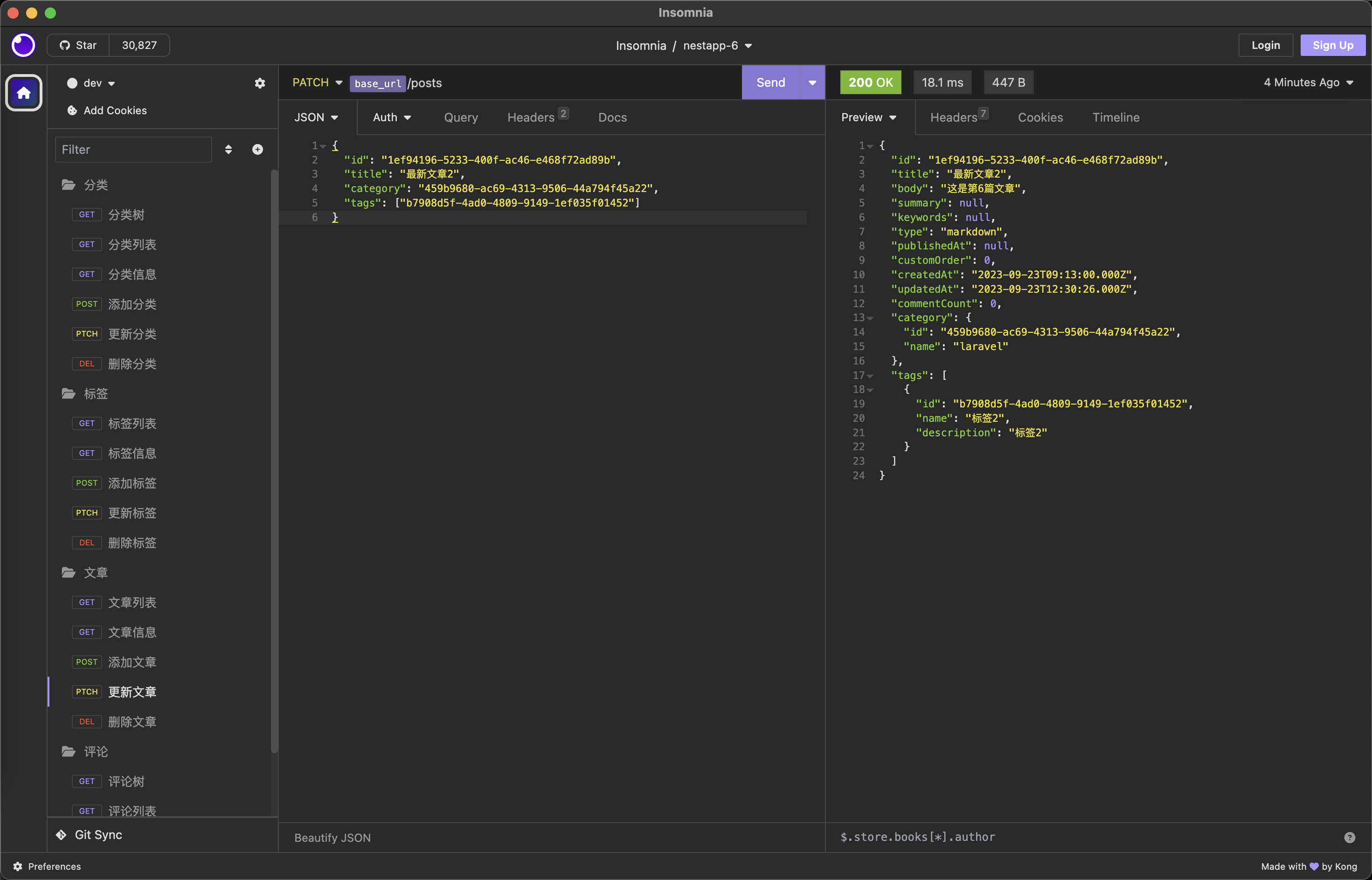
peipeo
2026年11月8日 10:32
转发文档
收藏文档
上一篇
下一篇
手机扫码
复制链接
手机扫一扫转发分享
复制链接
Markdown文件
PDF文档(打印)
分享
链接
类型
密码
更新密码