剪藏
Rethinking your position
Learn how to learn
3R编码 | nestjs最佳实践 - 课程概览
3R编码 | Node.js开发环境搭建
3R编码 | Nestjs+Eslint+SWC应用初始化及断点调试
3R编码 | 装饰器与反射
3R编码 | Nestjs核心概念
3R编码 | 无懈可击的Linux服务器构建
3R编码 | 使用Turborepo+pnpm workspaces构建monorepo应用
3R编码 | 使用Gitea+Drone自建CICD平台
3R编码 | 整合Typeorm实现CRUD
3R编码 | 请求数据的验证和响应数据的序列化
3R编码 | 数据关联与树形嵌套结构的分类和评论的实现
3R编码 | 自定义全局的验证管道,拦截器和过滤器
3R编码 | 自定义数据验证约束及约束中的依赖注入
3R编码 | 批量操作及软删除(回收站)功能使用
3R编码 | 数据库与MeiliSearch的全文搜索
3R编码 | 数据操作代码的抽象化
3R编码 | 整合bun与pm2实现开发环境与生产环境免编译和自启
3R编码 | 自建配置系统实现
3R编码 | 嵌套路由与Swagger文档实现
3R编码 | 使用Yargs构建命令行工具
3R编码 | 生产环境下静默启动以及PM2 API的使用
3R编码 | 数据迁移功能的实现
3R编码 | 数据填充命令实现
3R编码 | 用户模块开发以及使用Passport实现JWT认证和无痛刷新
3R编码 | 基于CASL的RBAC动态角色及权限系统实现
3R编码 | 模型动态关联与基于CASL的动态权限的实现
3R编码 | 使用BullMQ实现异步验证短信与邮件发送
3R编码 | WebSocket实现消息广播功能
3R编码 | chapter27
3R编码 | chapter28
3R编码 | TS全栈+AI开发实战 - 课程概览
3R编码 | Node.js环境搭建及应用初始化
3R编码 | Next.js应用初始化
3R编码 | React内置Hooks的使用与自定义详解
3R编码 | Next.js中使用Zustand进行状态管理详解
3R编码 | Next.js核心概念及应用构建
微电子学第1话 MOS Differential Pair (I)
微电子学第1话 MOS Differential Pair (I)
微电子学第3话 CMRR
微电子学第2话 MOS Differential Pair (II)
终于有人讲了,凭什么三极管能放大?
降低人类负担:类型系统即边界
固态变压器SST是什么
本站点使用 MrDoc 构建
-
+
3R编码 | 数据库与MeiliSearch的全文搜索
提示 关于MeiliSearch的使用方法,可查看其[官网文档](https://www.meilisearch.com/docs) - 使用Mysql的`like`实现全文搜索 - ~使用Mysql的`against`实现全文搜索~ - 使用MeiliSearch实现全文搜索 - ~使用ElasticSearch实现全文搜索~ 提示 新课使用MeilliSearch,所以关于Elastic的使用请自行查看旧课 由于篇幅限制,关于ElasticSearch的整合和使用方法,可以看旧课(文档地址在[这里](https://git.3rcd.com/classroom/old-tsclass-docs/src/branch/main/0-Nestjs%E6%9C%80%E4%BD%B3%E5%AE%9E%E8%B7%B5/2-%E5%86%85%E5%AE%B9%E6%A8%A1%E5%9D%97/7-%E4%BD%BF%E7%94%A8ElasticSearch%E5%8F%8AMysql%E4%B8%A4%E7%A7%8D%E6%96%B9%E5%BC%8F%E5%AE%9E%E7%8E%B0%E5%85%A8%E6%96%87%E6%90%9C%E7%B4%A2.md),代码地址在[这里](https://git.3rcd.com/classroom/old-nestjs-code/src/branch/main/chapter7))请自行查看学习 从这节课开始,因为不再提供sqlite数据库文件。课程的`back`目录里会有`databasex.sql`文件。在安装完mysql后,可以通过navicat或其它数据库管理工具导入 提示 后面的课程我们将会学习到迁移和数据填充,有了这两个功能后就不需要再去使用sqlite数据库文件或者`.sql`的mysql文件了。正如,后续我们会学习到openapi(swagger)构建api文档,这样就可以不再使用`Insomniax`这种文件导入导出了 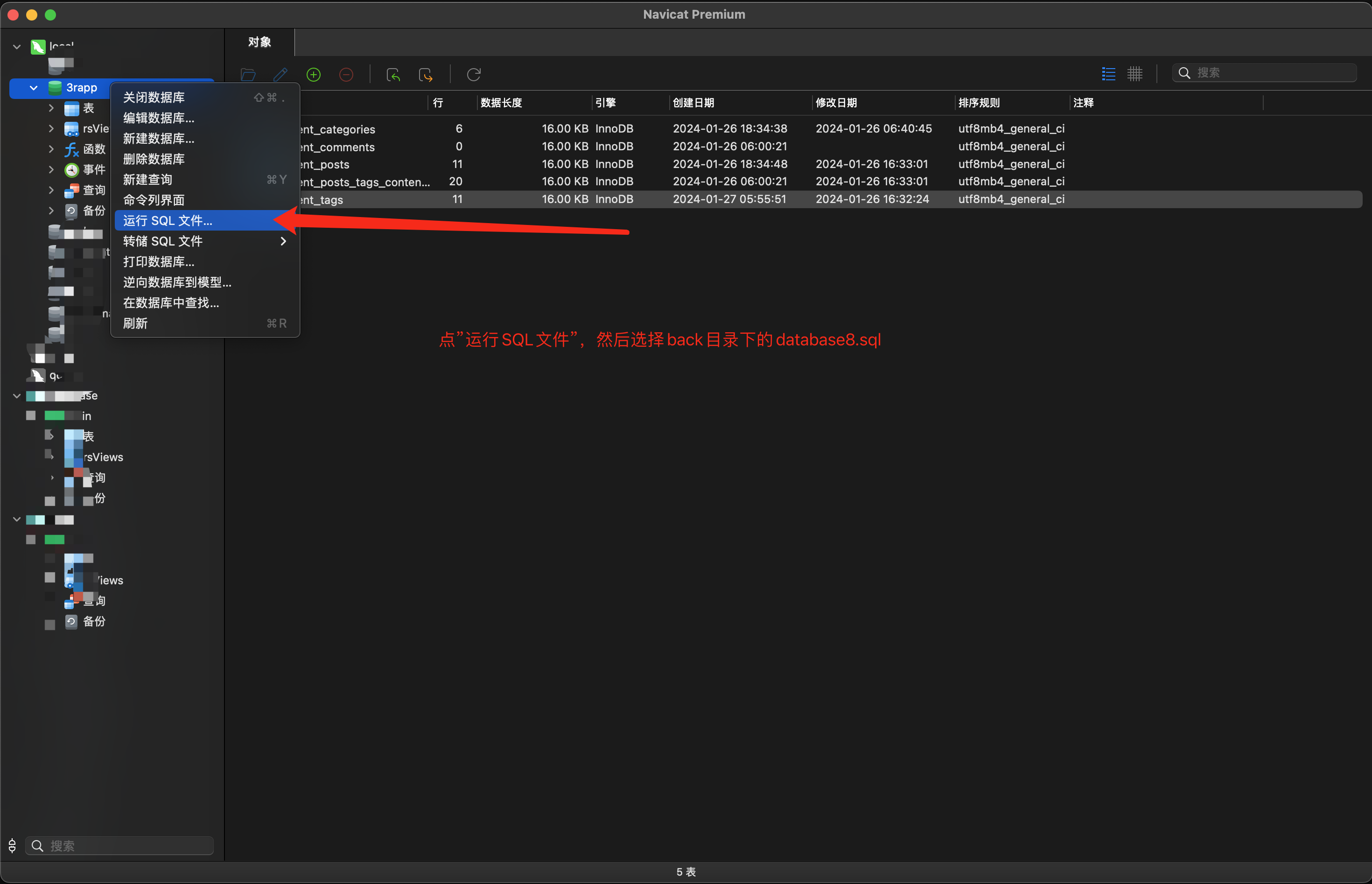 ### 安装Mysql[](#安装mysql "安装Mysql的直接链接") 如果是使用`debian`系或者`wsl2`的发型版,请查看以下文章 提示 `radhat`系发行版非常简单,直接`yum`即可。请自行谷歌查询安装配置方法 - [wls2安装数据库](https://learn.microsoft.com/zh-cn/windows/wsl/tutorials/wsl-database) - [ubuntu上安装mysql](https://www.cnblogs.com/RioTian/p/16066917.html) 如果出现**error1819**的问题请查阅以下文章解决 - [error1819解决1](https://www.ltsplus.com/mysql/fix-mysql-error-1819) - [error1819解决2](https://www.jianshu.com/p/b437566ccf98) 以下命令仅适用于**MacOS**及**Arch系**(如manjaro等)的Linux ``` # Mac下安装brew updatebrew install mysql# 启动服务brew services start mysql# 初始化mysqlmysql_secure_installation# 重启服务brew services restart mysql# 连接mysqlmysql -u root -p # 回车后输入你的密码# Arch系Linux下安装yay -Syy mysql # 如果没装yay就用pacman# 初始化mysqlsudo mysqld --initialize --user=mysql --basedir=/usr --datadir=/var/lib/mysql# 启动mysqlsudo systemctl start mysqld.service# 开机启动sudo systemctl enable mysqld.service# 修改密码ALTER USER 'root'@'localhost' IDENTIFIED BY '12345678;# 连接mysqlmysql -u root -p # 回车后输入你的密码 ``` 下载一个数据库管理工具,这里推荐使用**Navicat**(收费的),建议可以去[这个网站](https://appstorrent.ru/)看看。下载后连接数据库,并新增一个库(比如`3r`) 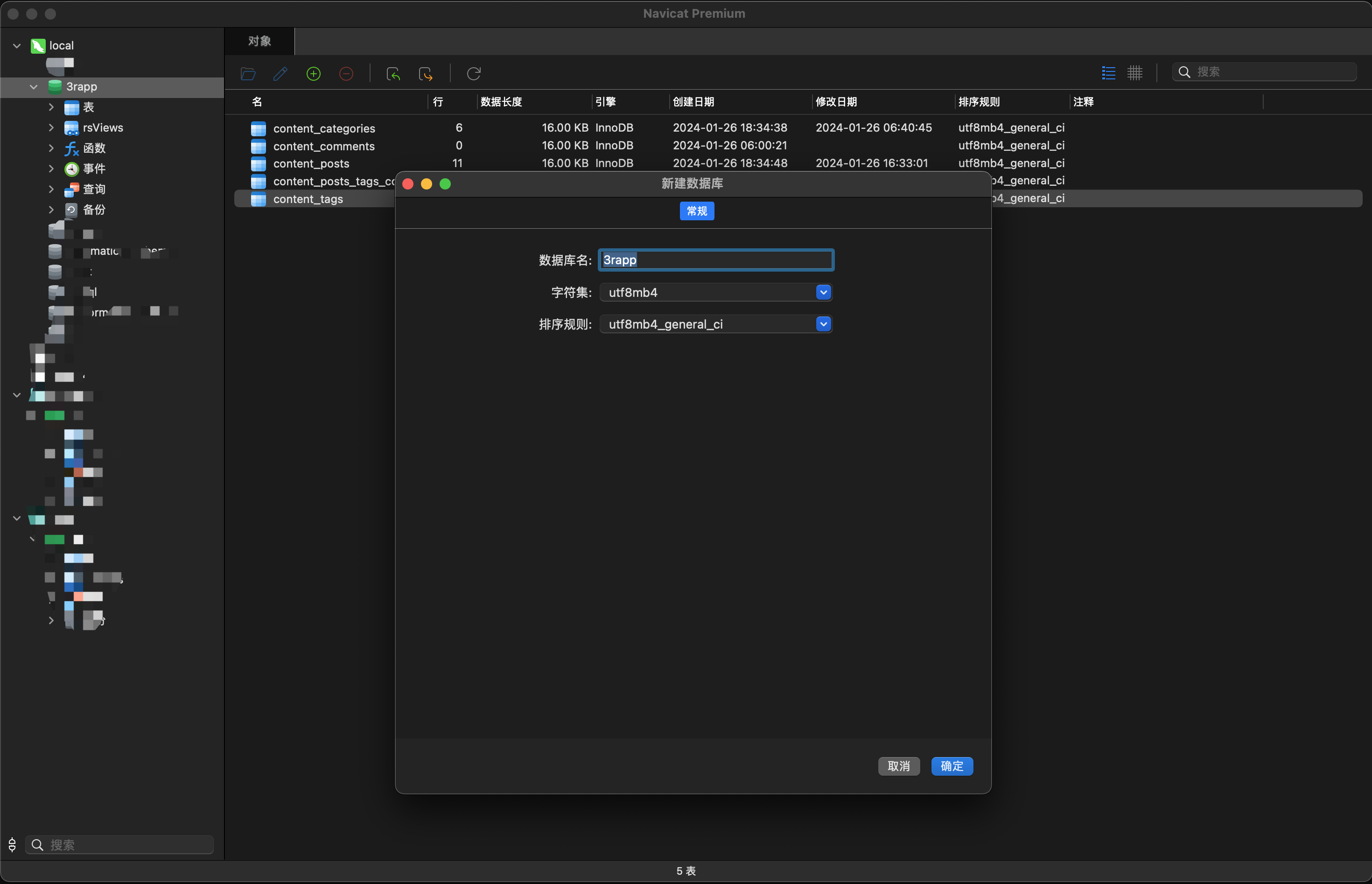 安装mysql依赖 ``` pnpm add mysql2 && pnpm remove better-sqlite3 ``` 替换数据库 ``` import { TypeOrmModuleOptions } from '@nestjs/typeorm';export const database = (): TypeOrmModuleOptions => ({ // 以下为mysql配置 charset: 'utf8mb4', logging: ['error'], type: 'mysql', host: '127.0.0.1', port: 3306, username: 'root', password: '12345678', database: '3rapp', // 以下为sqlite配置 // type: 'better-sqlite3', // database: resolve(__dirname, '../../database.db'), synchronize: true, autoLoadEntities: true,}); ``` **然后启动应用,并使用insomnia往数据库中添加一下,分类,标签,文章等数据** 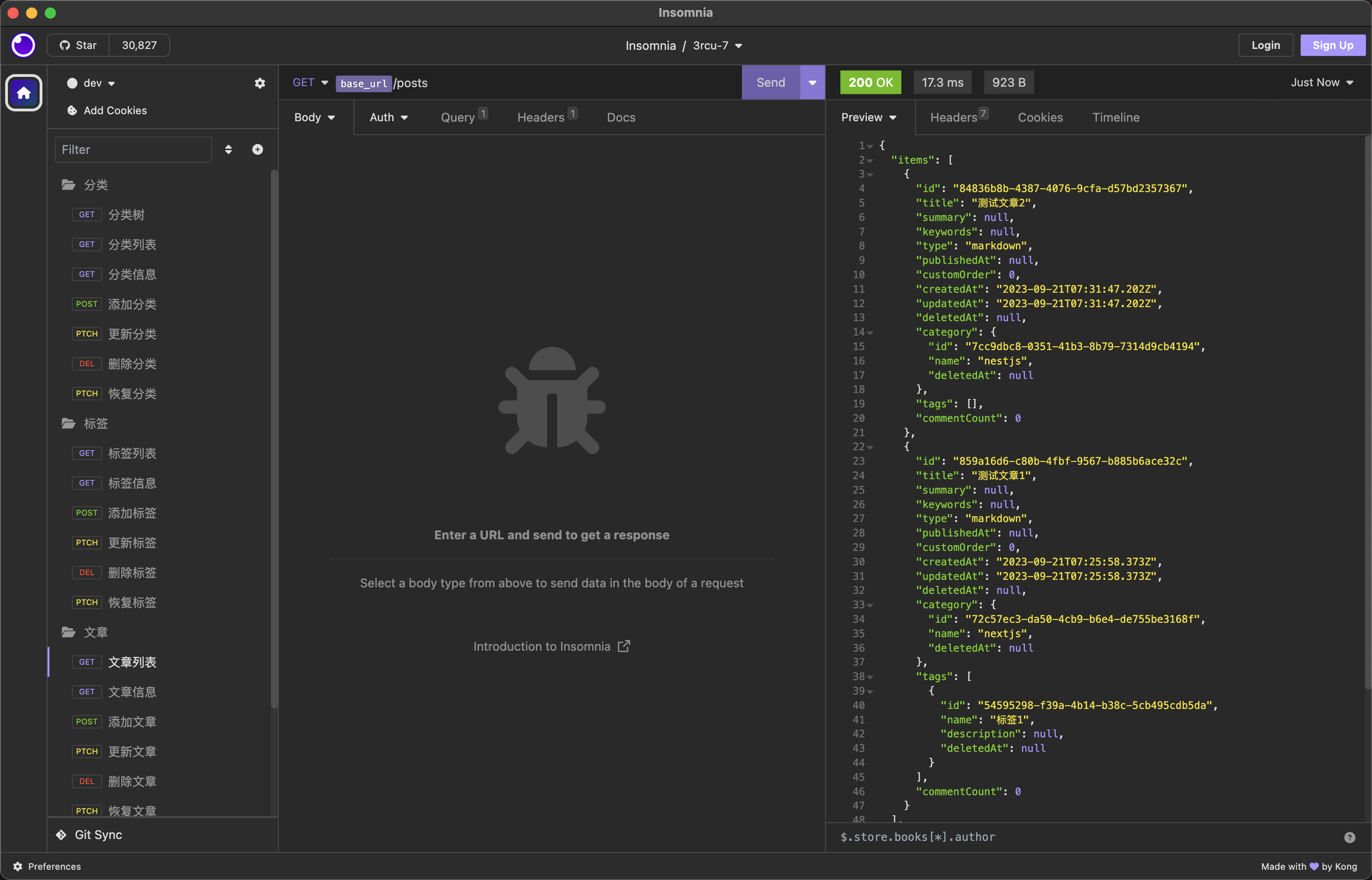 ### 模块配置[](#模块配置 "模块配置的直接链接") 为了我们可以根据配置随时调整全文搜索方式,需要为内容模块添加一个配置 注意 `against`并不好用,且与`unique`冲突,故课程已弃用 首先定义全文搜索模式的类型 - `mysql`代表使用传统的mysql`like`关键字实现全文搜索 - ~`against`代表使用mysql的`against`实现~ ``` // src/modules/content/types.ts// export type SearchType = 'like' | 'against'export type SearchType = 'mysql' ``` 加一个`ContentModule`的配置类型 ``` // src/modules/content/types.tsexport interface ContentConfig { searchType?: SearchType;} ``` 然后添加一个`content`配置 ``` // src/config/content.config.tsexport const content = (): ContentConfig => ({ searchType: 'mysql',});// src/config/index.tsexport * from './database.config';export * from './content.config'; ``` ### 数据模型[](#数据模型 "数据模型的直接链接") ~修改`PostEntity`以支持`against`关键字的全文搜索,为需要支持全文搜索功能的字段添加上`@Index({ fulltext: true })`索引~ ``` // src/modules/content/entities/post.entity.tsexport class PostEntity extends BaseEntity { @Expose() @PrimaryColumn({ type: 'varchar', generated: 'uuid', length: 36 }) id: string; @Expose() @Column({ comment: '文章标题' }) // @Index({ fulltext: true }) title: string; @Expose({ groups: ['post-detail'] }) @Column({ comment: '文章内容', type: 'text' }) // @Index({ fulltext: true }) body: string; @Expose() @Column({ comment: '文章描述', nullable: true }) // @Index({ fulltext: true }) summary?: string; //...} ``` ~同时为了支持使用关联的分类名称来全文搜索文章,我们还需要给`CategoryEntity`和`TagEntity`的`name`字段以及`CommentEntity`的`body`字段也添加一下`index`索引~ 注意 ~注意: 把`@Column`中的`unique: true`放入`@Index`中~ ### 请求验证[](#请求验证 "请求验证的直接链接") 修改`QueryPostDto`以便传入全文搜索的`query`属性 ``` // src/modules/content/dtos/post.dto.ts@DtoValidation({ type: 'query' })export class QueryPostDto implements PaginateOptions { @MaxLength(100, { always: true, message: '搜索字符串长度不得超过$constraint1', }) @IsOptional({ always: true }) search?: string; // ...} ``` ### 文章服务[](#文章服务 "文章服务的直接链接") 修改`PostService` - 添加一个`search_type`参数,通过这个参数设置就可以根据我们的配置我们的全文搜索模式,默认为`mysql` - 添加一个`buildSearchQuery`方法。在查询文章列表时,判断请求数据中是否有传入`search`属性,如果有传入则根据`search_type`是`mysql`还是其它模式返回不同方式的全文搜索后的分页结果 信息 ~`against`不支持向前的模糊匹配,比如一个文章关联的其中一个分类名称为`我是分类1`,你搜索时传入`我是*`是可以匹配到文章数据的,而传入`*分类1`是匹配不到的,**但是性能及佳**。具体语法的话自己谷歌就行(类似两种模式这些),用法很简单,不明白的话可以教室群提问!而`like`可以实现任何自动的模糊匹配,但是性能比较一般~ ~我们一般会这样使用,在中小型应用中,不考虑向前模糊匹配的话一般使用`against`,考虑到全文模糊匹配的话就使用`like`,大型应用可以使用Meilli、Elastic等专业的全文搜索工具~ ``` // src/modules/content/services/post.service.ts@Injectable()export class PostService { constructor( protected repository: PostRepository, protected categoryRepository: CategoryRepository, protected categoryService: CategoryService, protected tagRepository: TagRepository, protected search_type: SearchType = 'mysql', ) {} protected async buildListQuery( qb: SelectQueryBuilder<PostEntity>, options: FindParams, callback?: QueryHook<PostEntity>, ) { const { category, tag, orderBy, search, isPublished, trashed } = options; // ... if (!isNil(search)) this.buildSearchQuery(qb, search); // 是否查询回收站 if (trashed === SelectTrashMode.ALL || trashed === SelectTrashMode.ONLY) { qb.withDeleted(); if (trashed === SelectTrashMode.ONLY) qb.where(`post.deletedAt is not null`); } if (callback) return callback(qb); return qb; } /** * 构建mysql全文搜索的sql * @param qb * @param search */ protected async buildSearchQuery(qb: SelectQueryBuilder<PostEntity>, search: string) { qb.andWhere('title LIKE :search', { search: `%${search}%` }) .orWhere('body LIKE :search', { search: `%${search}%` }) .orWhere('summary LIKE :search', { search: `%${search}%` }) .orWhere('category.name LIKE :search', { search: `%${search}%`, }) .orWhere('tags.name LIKE :search', { search: `%${search}%`, }); return qb; }} ``` ### 内容模块[](#内容模块 "内容模块的直接链接") 因为我们需要为`PostService`的构造函数传入`content`配置中的`searchType`,这需要把原来的`PostService`提供者的注册方式改成使用`useFactory`的方式来注册(这部分基本概念不了解的同学请查看我们的[【Nestjs核心概念文档】](https://pincman-classroom.feishu.cn/wiki/wikcnAtvqktxBjBJlo30d271bwe)。这样的话,那么我们就需要把`ContentModule`变成动态模块了,以便传入`content`的配置,同时为了避免重复注册,我们需要把原来的`services/index.ts`导入的`PostService`给删除掉。 ``` // src/modules/content/services/index.tsexport * from './sanitize.service';export * from './category.service';// export * from './post.service';export * from './comment.service';// src/modules/content/content.module.ts@Module({})export class ContentModule { static forRoot(configRegister?: () => ContentConfig): DynamicModule { const config: Required<ContentConfig> = { searchType: 'mysql', ...(configRegister ? configRegister() : {}), }; const providers: ModuleMetadata['providers'] = [ ...Object.values(services), SanitizeService, PostSubscriber, { provide: PostService, inject: [ repositories.PostRepository, repositories.CategoryRepository, services.CategoryService, repositories.TagRepository, ], useFactory( postRepository: repositories.PostRepository, categoryRepository: repositories.CategoryRepository, categoryService: services.CategoryService, tagRepository: repositories.TagRepository, ) { return new PostService( postRepository, categoryRepository, categoryService, tagRepository, config.searchType, ); }, }, ]; return { module: ContentModule, imports: [ TypeOrmModule.forFeature(Object.values(entities)), DatabaseModule.forRepository(Object.values(repositories)), ], controllers: Object.values(controllers), providers, exports: [ ...Object.values(services), PostService, DatabaseModule.forRepository(Object.values(repositories)), ], }; }}// 别忘了修改控制器中PostService的导入路径// src/modules/content/controllers/post.controller.tsimport { PostService } from '../services/post.service';@Controller('posts')export class PostController { // ...} ``` ### 入口模块[](#入口模块 "入口模块的直接链接") 修改入口模块中`ContentModule`的导入方式 ``` // src/app.module.tsimport { content, database } from './config';@Module({ imports: [ ContentModule.forRoot(content), // ... ],})export class AppModule {} ``` 提示 目前Linux与Windows安装,大家按照[MeiliSearch](https://www.meilisearch.com/docs/learn/getting_started/installation)官方的方法来即可,MacOS下使用如下方式安装 ### 下载安装[](#下载安装 "下载安装的直接链接") ``` # 安装brew update && brew install meilisearch# 启动brew services start meilisearch ``` 打开[http://localhost:7700](http://localhost:7700/),看到如下界面,代表安装成功 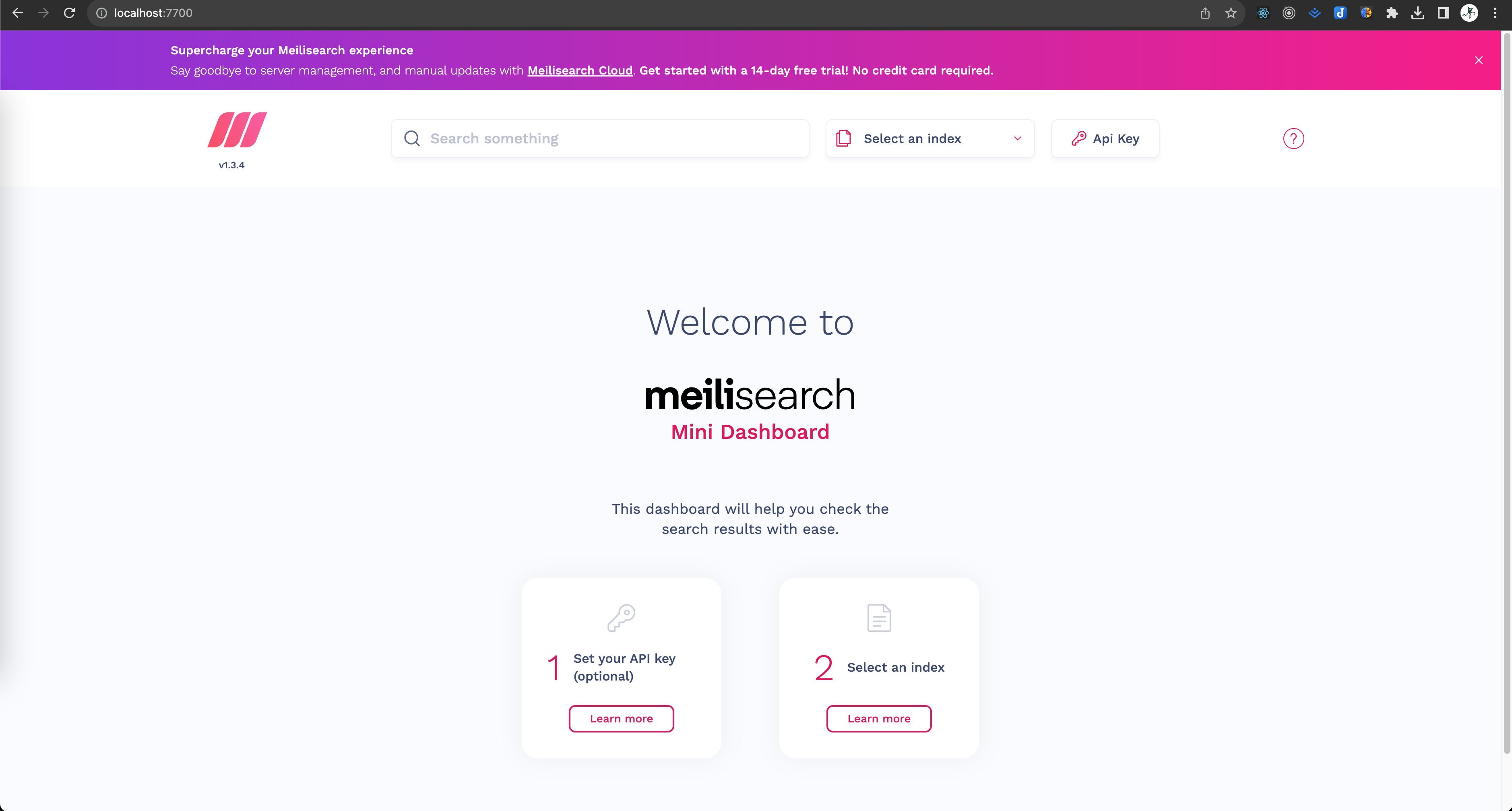 ### 整合Nestjs[](#整合nestjs "整合Nestjs的直接链接") #### 安装sdk[](#安装sdk "安装sdk的直接链接") ``` pnpm add meilisearch ``` #### 添加类型[](#添加类型 "添加类型的直接链接") ``` // src/modules/meilisearch/types.tsimport { Config } from 'meilisearch';// MelliSearch模块的配置export type MelliConfig = MelliOption[];// MeilliSearch的连接节点配置export type MelliOption = Config & { name: string }; ``` #### 辅助函数[](#辅助函数 "辅助函数的直接链接") 辅助函数用于根据传入的配置生成最终提供给`MeilliService`的配置,主要目的是判断默认(`default`)节点 ``` // src/modules/meilisearch/helpers.tsexport const createMeilliOptions = async ( config: MelliConfig,): Promise<MelliConfig | undefined> => { if (config.length <= 0) return config; let options: MelliConfig = [...config]; const names = options.map(({ name }) => name); if (!names.includes('default')) options[0].name = 'default'; else if (names.filter((name) => name === 'default').length > 0) { options = options.reduce( (o, n) => (o.map(({ name }) => name).includes('default') ? o : [...o, n]), [], ); } return options;}; ``` #### 客户端服务[](#客户端服务 "客户端服务的直接链接") 该服务用于根据配置连接MeilliSearch的节点以及获取连接后的客户端 ``` // src/modules/meilisearch/meilli.service.ts@Injectable()export class MeilliService { protected options: MelliConfig; /** * 客户端连接 */ protected clients: Map<string, MeiliSearch> = new Map(); constructor(options: MelliConfig) { this.options = options; } getOptions() { return this.options; } /** * 通过配置创建所有连接 */ async createClients() { this.options.forEach(async (o) => { this.clients.set(o.name, new MeiliSearch(o)); }); } /** * 获取一个客户端连接 * @param name 连接名称,默认default */ getClient(name?: string): MeiliSearch { let key = 'default'; if (!isNil(name)) key = name; if (!this.clients.has(key)) { throw new Error(`client ${key} does not exist`); } return this.clients.get(key); } /** * 获取所有客户端连接 */ getClients(): Map<string, MeiliSearch> { return this.clients; }} ``` #### 模块设置[](#模块设置 "模块设置的直接链接") 模块为动态模块,传入配置并实例化`MeilliService` ``` // src/modules/meilisearch/melli.module.ts@Module({})export class MeilliModule { static forRoot(configRegister: () => MelliConfig): DynamicModule { return { global: true, module: MeilliModule, providers: [ { provide: MeilliService, useFactory: async () => { const service = new MeilliService( await createMeilliOptions(configRegister()), ); service.createClients(); return service; }, }, ], exports: [MeilliService], }; }} ``` ### 引导模块[](#引导模块 "引导模块的直接链接") 编写一个MeilliSearch的配置 ``` // src/config/meilli.config.tsimport { MelliConfig } from '@/modules/meilisearch/types';export const meilli = (): MelliConfig => [ { name: 'default', host: 'http://localhost:7700', },]; ``` 然后修改`AppModule`,导入`MeilliModule` ``` // src/app.module.ts@Module({ imports: [ ContentModule.forRoot(content), CoreModule.forRoot(), DatabaseModule.forRoot(database), MeilliModule.forRoot(meilli), ], // ...})export class AppModule {} ``` ### 搜索服务[](#搜索服务 "搜索服务的直接链接") 首先我们添加一个用于查询一个分类的祖先分类并打平的方法,这样方便后续全文搜索出的结果展示 ``` // src/modules/content/repositories/category.repository.ts@CustomRepository(CategoryEntity)export class CategoryRepository extends TreeRepository<CategoryEntity> { // ... async flatAncestorsTree(item: CategoryEntity) { let data: Omit<CategoryEntity, 'children'>[] = []; const category = await this.findAncestorsTree(item); const { parent } = category; unset(category, 'children'); unset(category, 'parent'); data.push(item); if (!isNil(parent)) data = [...(await this.flatAncestorsTree(parent)), ...data]; return data as CategoryEntity[]; }} ``` #### 搜索选项[](#搜索选项 "搜索选项的直接链接") 这几个类型不用再多做解释了 ``` // src/modules/content/types.tsexport interface SearchOption { trashed?: SelectTrashMode; isPublished?: boolean; page?: number; limit?: number;} ``` #### 辅助函数[](#辅助函数-1 "辅助函数的直接链接") 课程为了简洁,我们只做简单的文章全文搜索服务。如果有需要的话,可以自行添加更多功能,例如,根据分类进行分片搜索等。 为此需要添加两个函数 - `getSearchItem`: 根据传入的文章模型对象及关联的分类等来生成单个数据,这个数据用于放入MeilliSearch作为后续搜索的document - `getSearchData`: 根据传入的文章模型的对象数组列表来生成多个数据,这个数据用于放入MeilliSearch作为后续搜索的document ``` // src/modules/content/helpers.tsexport async function getSearchItem( catRepo: CategoryRepository, cmtRepo: CommentRepository, post: PostEntity,) { const categories = isNil(post.category) ? [] : (await catRepo.flatAncestorsTree(post.category)).map((item) => ({ id: item.id, name: item.name, })); const comments = ( await cmtRepo.find({ relations: ['post'], where: { post: { id: post.id } }, }) ).map((item) => ({ id: item.id, body: item.body })); return [ { ...pick(instanceToPlain(post), [ 'id', 'title', 'body', 'summary', 'commentCount', 'deletedAt', 'publishedAt', 'createdAt', 'updatedAt', ]), categories, tags: post.tags.map((item) => ({ id: item.id, name: item.name })), comments, }, ];}export const getSearchData = async ( posts: PostEntity[], catRepo: CategoryRepository, cmtRepo: CommentRepository,) => (await Promise.all(posts.map(async (post) => getSearchItem(catRepo, cmtRepo, post)))).reduce( (o, n) => [...o, ...n], [], ); ``` #### 服务类[](#服务类 "服务类的直接链接") - `onModuleInit`用于在每次启动应用时初始化`content`这个**Index**,并同步mysql数据库中的文章数据到**meilli** - `search`搜索数据,可以根据文章关联的分类,标签名称和评论内容,以及文章自身的标题,内容,软删除状态,发布状态等进行搜索,并根据最后更新时间和评论数量进行综合排序 - `create`、`update`、`delete`用于对搜索数据进行增删改 ``` // src/modules/content/services/search.service.ts@Injectable()export class SearchService implements OnModuleInit { index = 'content'; protected _client: MeiliSearch; constructor( protected meilliService: MeilliService, protected categoryRepository: CategoryRepository, protected postRepository: PostRepository, protected commentRepository: CommentRepository, // private moduleRef: ModuleRef, ) { this._client = this.meilliService.getClient(); } async onModuleInit() { await this.client.deleteIndex('content'); this.client.index(this.index).updateFilterableAttributes(['deletedAt', 'publishedAt']); this.client.index(this.index).updateSortableAttributes(['updatedAt', 'commentCount']); const posts = await this.postRepository.buildBaseQB().withDeleted().getMany(); await this.client .index(this.index) .addDocuments( await getSearchData(posts, this.categoryRepository, this.commentRepository), ); } get client() { if (isNil(this._client)) throw new ForbiddenException('Has not any meilli search client!'); return this._client; } async search(text: string, param: SearchOption = {}) { const option = { page: 1, limit: 10, trashed: SelectTrashMode.NONE, ...param }; const limit = isNil(option.limit) || option.limit < 1 ? 1 : option.limit; const page = isNil(option.page) || option.page < 1 ? 1 : option.page; let filter = ['deletedAt IS NULL']; if (option.trashed === SelectTrashMode.ALL) { filter = []; } else if (option.trashed === SelectTrashMode.ONLY) { filter = ['deletedAt IS NOT NULL']; } if (option.isPublished) { filter.push('publishedAt IS NOT NULL'); } const result = await this.client.index(this.index).search(text, { page, limit, sort: ['updatedAt:desc', 'commentCount:desc'], filter, }); return { items: result.hits, currentPage: result.page, perPage: result.hitsPerPage, totalItems: result.estimatedTotalHits, itemCount: result.totalHits, ...omit(result, ['hits', 'page', 'hitsPerPage', 'estimatedTotalHits', 'totalHits']), }; } async create(post: PostEntity) { return this.client .index(this.index) .addDocuments( await getSearchItem(this.categoryRepository, this.commentRepository, post), ); } async update(posts: PostEntity[]) { return this.client .index(this.index) .updateDocuments( await getSearchData(posts, this.categoryRepository, this.commentRepository), ); } async delete(ids: string[]) { return this.client.index(this.index).deleteDocuments(ids); }} ``` ### 文章服务[](#文章服务-1 "文章服务的直接链接") 添加一个搜索类型 ``` // src/modules/content/types.tsexport type SearchType = 'mysql' | 'meilli'; ``` 修改`PostService` - 注入可选的`SearchService`,当搜索类型为`meilli`时注入 - 在文章的CRUD方法中,当搜索类型为`meilli`时,调用`SearchService`的相关方法 - 删除文章时,如果是软删除的数据就更新meilli里面的`deletedAt`字段,如果应删除则直接删除meilli中的相关文章数据 - 恢复文章时,重置文章在melli里面的`daletedAt`字段 ``` // src/modules/content/services/post.service.ts@Injectable()export class PostService { constructor( protected repository: PostRepository, protected categoryRepository: CategoryRepository, protected categoryService: CategoryService, protected tagRepository: TagRepository, protected searchService?: SearchService, protected search_type: SearchType = 'mysql', ) {} async paginate(options: QueryPostDto, callback?: QueryHook<PostEntity>) { if (!isNil(this.searchService) && !isNil(options.search) && this.search_type === 'meilli') { return this.searchService.search( options.search, pick(options, ['trashed', 'page', 'limit']), ); } const qb = await this.buildListQuery(this.repository.buildBaseQB(), options, callback); return paginate(qb, options); } async create(data: CreatePostDto) { // ... const result = await this.detail(item.id); if (!isNil(this.searchService)) await this.searchService.create(result); return result; } async update(data: UpdatePostDto) { // ... await this.repository.update(data.id, omit(data, ['id', 'tags', 'category'])); const result = await this.detail(data.id); if (!isNil(this.searchService)) await this.searchService.update([result]); return result; } /** * 批量删除文章 * @param ids * @param trash */ async delete(ids: string[], trash?: boolean) { // ... if (trash) { // 对已软删除的数据再次删除时直接通过remove方法从数据库中清除 const directs = items.filter((item) => !isNil(item.deletedAt)); const directIds = directs.map(({ id }) => id); const softs = items.filter((item) => isNil(item.deletedAt)); result = [ ...(await this.repository.remove(directs)), ...(await this.repository.softRemove(softs)), ]; if (!isNil(this.searchService)) { await this.searchService.delete(directIds); await this.searchService.update(softs); } } else { result = await this.repository.remove(items); if (!isNil(this.searchService)) { await this.searchService.delete(ids); } } return result; } /** * 恢复文章 * @param ids */ async restore(ids: string[]) { // ... await this.repository.restore(trashedsIds); await this.searchService.update(trasheds); const qb = await this.buildListQuery(this.repository.buildBaseQB(), {}, async (qbuilder) => qbuilder.andWhereInIds(trashedsIds), ); return qb.getMany(); }} ``` ### 内容模块[](#内容模块-1 "内容模块的直接链接") 修改一下`ContentModule`,让`PostService`可以根据搜索类型可选导入`SearchService` ``` // src/modules/content/content.module.ts@Module({})export class ContentModule { static forRoot(configRegister?: () => ContentConfig): DynamicModule { const config: Required<ContentConfig> = { searchType: 'against', ...(configRegister ? configRegister() : {}), }; const providers: ModuleMetadata['providers'] = [ ...Object.values(services), SanitizeService, PostSubscriber, { provide: PostService, inject: [ repositories.PostRepository, repositories.CategoryRepository, services.CategoryService, repositories.TagRepository, { token: services.SearchService, optional: true }, ], useFactory( postRepository: repositories.PostRepository, categoryRepository: repositories.CategoryRepository, categoryService: services.CategoryService, tagRepository: repositories.TagRepository, searchService: services.SearchService, ) { return new PostService( postRepository, categoryRepository, categoryService, tagRepository, searchService, config.searchType, ); }, }, ]; if (config.searchType === 'meilli') providers.push(services.SearchService); return { module: ContentModule, imports: [ TypeOrmModule.forFeature(Object.values(entities)), DatabaseModule.forRepository(Object.values(repositories)), ], controllers: Object.values(controllers), providers, exports: [ ...Object.values(services), PostService, DatabaseModule.forRepository(Object.values(repositories)), ], }; }} ``` 现在我们启动应用试试搜索功能 提示 本节课的API不用变,只要在上一节的基础上,给文章查询接口加个`search`字段即可 先测试一下`like`模式 ``` // src/config/content.config.tsexport const content = (): ContentConfig => ({ searchType: 'mysql',}); ``` 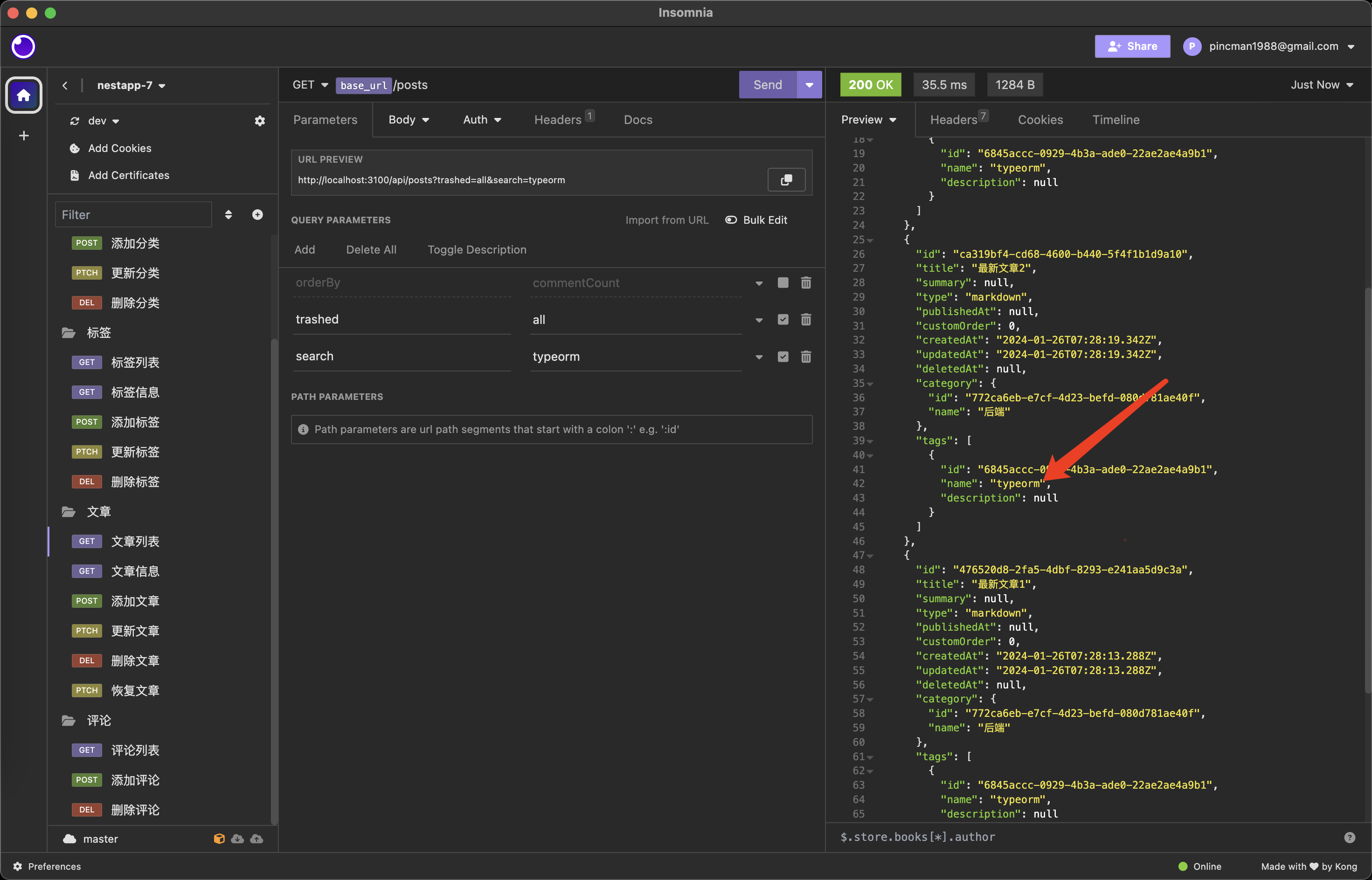 再测试一下MeilliSearch 信息 ``` // src/config/content.config.tsexport const content = (): ContentConfig => ({ searchType: 'meilli',}); ``` 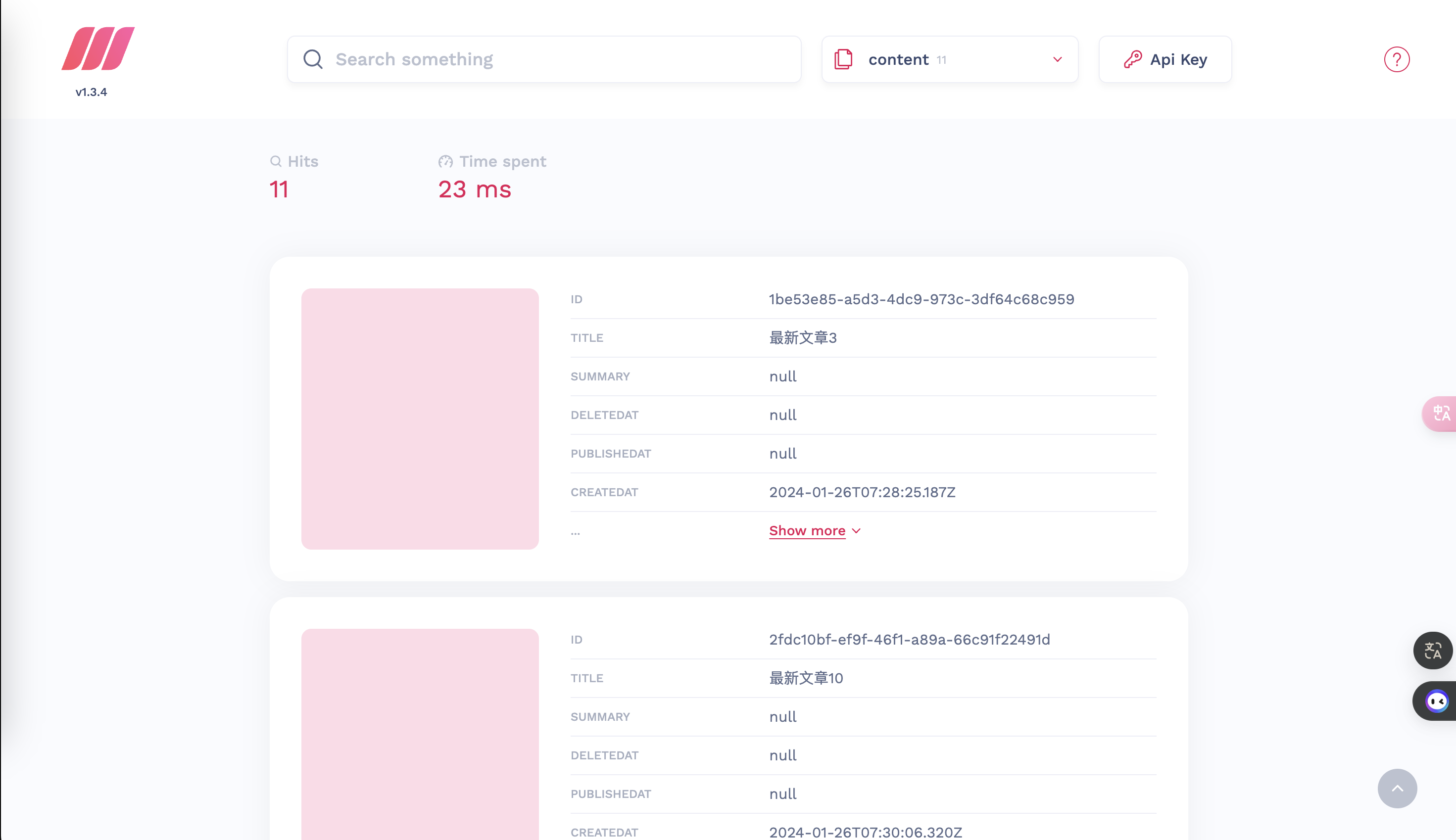 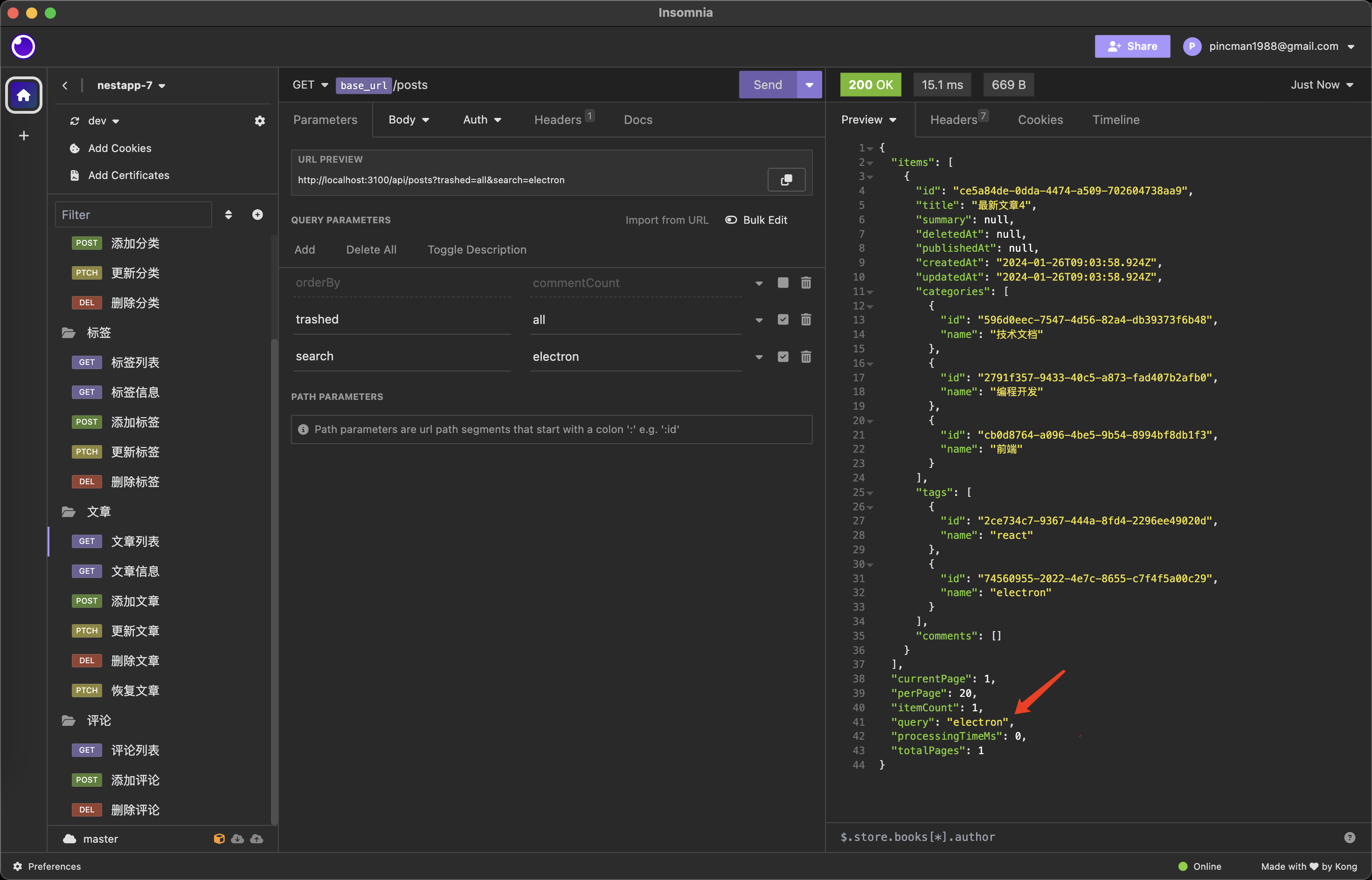
peipeo
2026年11月8日 10:32
转发文档
收藏文档
上一篇
下一篇
手机扫码
复制链接
手机扫一扫转发分享
复制链接
Markdown文件
PDF文档(打印)
分享
链接
类型
密码
更新密码